Trice over RTT
Contents
- 1. For the impatient (2 possibilities)
- 2. Segger Real Time Transfer (RTT)
- 3. J-Link option
- 4. Segger RTT
- 5. Segger J-Link SDK (~800 EUR) Option
- 6. Additional Notes (leftovers)
- 7. Further development
- 8. NUCLEO-F030R8 example
- 9. Possible issues
- 10. OpenOCD with Darwin (macOS)
- 11. SEGGER J-Link on Darwin (macOS)
- 12. Links
Allows Trice over the debug probe without using a pin or UART.
The RTT target sources come from SEGGER’s official SEGGERMicro/RTT repository.
Trice includes the unmodified SEGGER_RTT.c, SEGGER_RTT.h, and SEGGER_RTT_ConfDefaults.h
from commit 4d8feab3150f86f37a9d323ddc88d6cdf5673072
(2026-06-03), together with the SEGGER license.
The source snapshot is independent of the J-Link host-tool version:
installing J-Link V9.84 does not replace the sources compiled into your firmware.
SEGGER removed the RTT source ZIP from the J-Link installation package in V8.68;
obtain source updates from its GitHub repository instead.
The library includes a fallback SEGGER_RTT_Conf.h.
Put your project and generated include directories first, then src, and src/default_conf last:
-Iproject -Igenerated -Isrc -Isrc/default_conf
Your project’s SEGGER_RTT_Conf.h takes precedence and replaces the entire fallback configuration.
SEGGER’s SEGGER_RTT_ConfDefaults.h first includes that selected
configuration, then fills in missing settings with #ifndef defaults.
This is the same principle as Trice’s triceConfig.h and triceDefaultConfig.h.
New project headers need only define their deviations; they no longer need to copy all vendor defaults and CPU-specific lock implementations.
The Trice fallback keeps only its channel counts, C implementation selection, ARM memory barriers, and native Windows lock policy.
An empty project header is valid for RTT itself, but selects SEGGER’s three up-/down-channel slots,
not Trice’s one-slot defaults; its compiler-selected assembly and Windows lock defaults may also need overrides.
Do not put a configuration directly in src: SEGGER’s quoted include searches that directory before the -I directories, which would hide your project configuration.
The fallback provides one up-channel with a 1024-byte buffer, one down-channel with a 16-byte buffer, and non-blocking output that skips a write if the buffer is full.
It uses the C implementation without requiring external RTT assembly files or embOS on Windows.
It retains SEGGER’s CPU-specific interrupt locks; check the interrupt-priority and cache settings for your target before relying on concurrent RTT access.
Native host builds use no-op locks and need a project-specific configuration for concurrent RTT writers.
Adding the fallback include path does not enable RTT in triceConfig.h or make every file in src necessary for your application.
When updating an existing project, copy all three vendor files and retain SEGGER_RTT_LICENSE.md.
Keep your existing SEGGER_RTT_Conf.h: full configurations from older RTT releases remain usable,
and their explicitly defined values and lock macros take precedence over the new defaults.
Do not replace them with an empty header.
Trice derives matching TRICE_... values from the selected SEGGER configuration automatically.
Only explicit overrides in triceConfig.h need to match; Trice checks them at compilation.
The optional SEGGER_RTT_ASM_ARMv7M.S is not shipped here.
Use RTT_USE_ASM=0 when compiling only the C implementation.
Project configurations still need appropriate memory barriers, interrupt locks and cache settings for their CPU.
Trice’s optimized 32-bit writer directly accesses the RTT control block, so a future vendor update must also be checked against that path.
- RTT works good with a SEGGER J-Link debug probe but needs some closed source software components.
- Also ST-Link is usable for Trice logs, but maybe not parallel with debugging.
- Most investigations where done with a NUCLEO64-STM32F030R8 evaluation board which contains an on-board debug probe reflashed with a SEGGER J-Link OB software (see below).
- When using very high Trice loads over RTT for a long time, sometimes an on-board J-Link (re-flashed ST-Link) could get internally into an inconsistent state (probably internal buffer overrun), what needs a power cycle then.
- You could consider RTT over open-OCD as an alternative.
-
The default SEGGER up-buffer size is 1024 bytes, good for most cases. To change it, set the size in your project-specific SEGGER_RTT_Conf.h. Trice inherits it automatically: You need only one up-channel for Trice:
#define BUFFER_SIZE_UP (128) // "TRICE_DIRECT_BUFFER_SIZE" - triceDefaultConfig.h automatically loads the selected SEGGER configuration when the RTT backend or RTT lock support is active. It derives all five
TRICE_*buffer-size and channel-count defaults from those settings, so matching definitions in triceConfig.h are unnecessary. ExplicitTRICE_*values remain supported; a mismatch with SEGGER_RTT_Conf.h produces a compiler error. Configure RTT itself in SEGGER_RTT_Conf.h, since SEGGER sources read that file independently of Trice. - Possible: Parallel usage of RTT direct mode with UART deferred mode. You can define
TRICE_UARTA_MIN_IDandTRICE_UARTA_MAX_IDinside triceConfig.h to log only a specific ID range over UARTA in deferred mode for example. (#446)
1. For the impatient (2 possibilities)
The default SEGGER tools only suport RTT channel 0.
1.1. Start JLink commander and connect over TCP
- JLink.exe →
connect ⏎ ⏎ S ⏎and keep it active.- You can control the target with
r[eset], g[o], h[alt]and use other commands too. 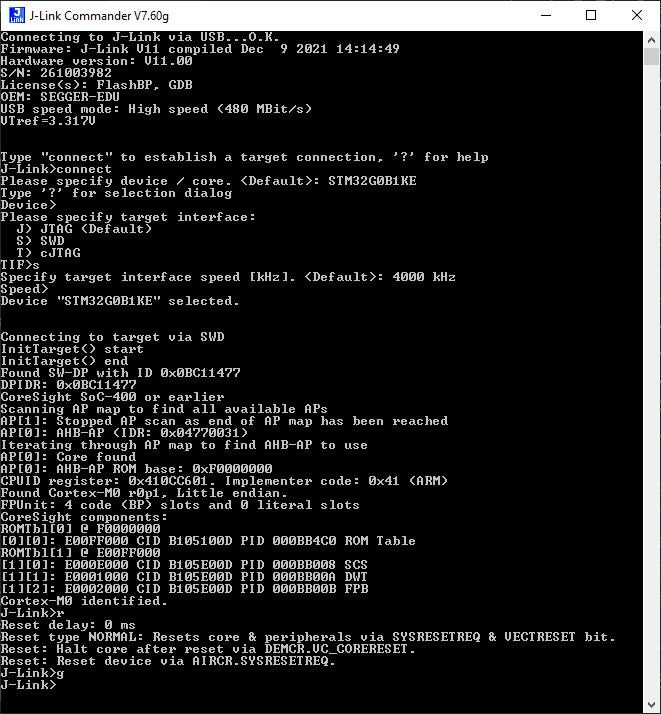
- You can control the target with
- Start in Git-Bash or something similar:
trice l -p TCP4 -args localhost:19021 - You may need a Trice tool restart after firmware reload.
1.1.1. Setup TCP4 server providing the trace data
This is just the SEGGER J-Link server here for demonstration, but if your target device has an TCP4 interface, you can replace this with your target server.
ms@DESKTOP-7POEGPB MINGW64 ~/repos/trice (main)
$ jlink
SEGGER J-Link Commander V7.92g (Compiled Sep 27 2023 15:36:46)
DLL version V7.92g, compiled Sep 27 2023 15:35:10

Connecting to J-Link via USB...O.K.
Firmware: J-Link STLink V21 compiled Aug 12 2019 10:29:20
Hardware version: V1.00
J-Link uptime (since boot): N/A (Not supported by this model)
S/N: 770806762
VTref=3.300V


Type "connect" to establish a target connection, '?' for help
J-Link>connect
Please specify device / core. <Default>: STM32G0B1RE
Type '?' for selection dialog
Device>
Please specify target interface:
  J) JTAG (Default)
  S) SWD
  T) cJTAG
TIF>s
Specify target interface speed [kHz]. <Default>: 4000 kHz
Speed>
Device "STM32G0B1RE" selected.


Connecting to target via SWD
InitTarget() start
SWD selected. Executing JTAG -> SWD switching sequence.
DAP initialized successfully.
InitTarget() end - Took 36.3ms
Found SW-DP with ID 0x0BC11477
DPv0 detected
CoreSight SoC-400 or earlier
Scanning AP map to find all available APs
AP[1]: Stopped AP scan as end of AP map has been reached
AP[0]: AHB-AP (IDR: 0x04770031)
Iterating through AP map to find AHB-AP to use
AP[0]: Core found
AP[0]: AHB-AP ROM base: 0xF0000000
CPUID register: 0x410CC601. Implementer code: 0x41 (ARM)
Found Cortex-M0 r0p1, Little endian.
FPUnit: 4 code (BP) slots and 0 literal slots
CoreSight components:
ROMTbl[0] @ F0000000
[0][0]: E00FF000 CID B105100D PID 000BB4C0 ROM Table
ROMTbl[1] @ E00FF000
[1][0]: E000E000 CID B105E00D PID 000BB008 SCS
[1][1]: E0001000 CID B105E00D PID 000BB00A DWT
[1][2]: E0002000 CID B105E00D PID 000BB00B FPB
Memory zones:
  Zone: "Default" Description: Default access mode
Cortex-M0 identified.
J-Link>
Now the TCP4 server is running and you can start the Trice tool as TCP4 client, which connects to the TCP4 server to receive the binary log data:
$ trice l -p TCP4 -args="127.0.0.1:19021" -til ../examples/G0B1_inst/til.json -li ../examples/G0B1_inst/li.json -d16 -pf none
In this G0B1_inst example we use the additional -d16 and -pf none switches to decode the RTT data correctly.
This is a demonstration and test for the -port TCP4 usage possibility. Using RTT with J-Link is more easy possible as shown in the next point.
1.2. Start using JLinkRTTLogger
- Start inside Git-Bash or something similar:
trice l -p JLINK -args "-Device STM32F030R8 -if SWD -Speed 4000 -RTTChannel 0"- Replace CLI details with your settings.
- For G0B1_inst:
trice l -p JLINK -args "-Device STM32G0B1RE -if SWD -Speed 4000 -RTTChannel 0" -d16 -pf none - You can add the
-verboseCLI switch for more details.
- You may not need a Trice tool restart after firmware reload.
1.3. JLinkRTTLogger Issue
- For some reason the RTT technique does not work well with Darwin (macOS) and also Linux right now. The problem seems to be that the JLinkRTTLogger app cannot work correctly in the background. But there is a workaround:
- Example 1:
- In one terminal run
JLinkRTTLogger -Device STM32G0B1RE -if SWD -Speed 4000 -RTTChannel 0 myLogFile.bin - and in another terminal execute
trice l -p FILE -args myLogFile.bin -pf none -d16.
- In one terminal run
- Example 2:
- Flash, start debugger and run to main()
- Terminal 1:
rm ./temp/trice.bin && JLinkRTTLogger -Device STM32G0B1RE -If SWD -Speed 4000 -RTTChannel 0 ./temp/trice.bin - Terminal 2:
touch ./temp/trice.bin && trice log -p FILE -args ./temp/trice.bin -prefix off -hs off -d16 -ts ms -i ../../demoTIL.json -li ../../demoLI.json -pf none - Continue to run in debugger
-
Terminal 1:
```bash th@P51-DebianKDE:~/repos/trice/examples/G0B1_inst$ rm ./temp/trice.bin && JLinkRTTLogger -Device STM32G0B1RE -If SWD -Speed 4000 -RTTChannel 0 ./temp/trice.bin SEGGER J-Link RTT Logger Compiled Dec 18 2024 15:48:21 (c) 2016-2017 SEGGER Microcontroller GmbH, www.segger.com Solutions for real time microcontroller applications
Default logfile path: /home/th/.config/SEGGER
Connected to: SEGGER J-Link ST-LINK S/N: 779220206
Searching for RTT Control Block…OK. 1 up-channels found: 0: Terminal Selected RTT Channel description: Index: 0 Name: Terminal Size: 1024 bytes.
Output file: ./temp/trice.bin
Getting RTT data from target. Press any key to quit. ————————————————————
Transfer rate: 0 Bytes/s Data written: 15.71 KB
* Terminal 2: ```bash th@P51-DebianKDE:~/repos/trice/examples/G0B1_inst$ touch ./temp/trice.bin && trice log -p FILE -args ./temp/trice.bin -prefix off -hs off -d16 -ts ms -i ../../demoTIL.json -li ../../demoLI.json -pf none triceExamples.c 12 0,000 Hello! 👋🙂 ✨✨✨✨✨✨✨✨✨✨✨✨✨✨✨✨✨ 🎈🎈🎈🎈 NUCLEO-G0B1RE 🎈🎈🎈🎈 🍃🍃🍃🍃🍃🍃🍃🍃🍃🍃🍃🍃🍃🍃🍃🍃🍃 triceExamples.c 61 TRICE_DIRECT_OUTPUT == 1, TRICE_DEFERRED_OUTPUT == 1 triceExamples.c 69 TRICE_RING_BUFFER, TRICE_MULTI_PACK_MODE triceExamples.c 76 _CYCLE == 1, _PROTECT == 1, _DIAG == 1, XTEA == 1 triceExamples.c 77 _SINGLE_MAX_SIZE=104, _BUFFER_SIZE=172, _DEFERRED_BUFFER_SIZE=2000 triceExamples.c 29 0:00:00,003 🐁 Speedy Gonzales a 32-bit timestamp triceExamples.c 30 0:00:00,003 🐁 Speedy Gonzales b 32-bit timestamp triceExamples.c 31 0:00:00,003 🐁 Speedy Gonzales c 32-bit timestamp triceExamples.c 32 0:00:00,003 🐁 Speedy Gonzales d 32-bit timestamp triceExamples.c 33 0,310 🐁 Speedy Gonzales e 16-bit timestamp triceExamples.c 34 0,328 🐁 Speedy Gonzales f 16-bit timestamp triceExamples.c 35 0,347 🐁 Speedy Gonzales g 16-bit timestamp triceExamples.c 36 0,365 🐁 Speedy Gonzales h 16-bit timestamp triceExamples.c 42 0,394 2.71828182845904523536 <- float number as string triceExamples.c 43 0,436 2.71828182845904509080 (double with more ciphers than precision) triceExamples.c 44 0,458 2.71828174591064453125 (float with more ciphers than precision) triceExamples.c 45 0,479 2.718282 (default rounded float) triceExamples.c 46 0,500 A Buffer: triceExamples.c 47 0,520 32 2e 37 31 38 32 38 31 38 32 38 34 35 39 30 34 35 32 33 35 33 36 triceExamples.c 48 0,562 31372e32 31383238 34383238 34303935 35333235 ... triceExamples.c 50 3 times a 16 byte long Trice messages, which may not be written all if the buffer is too small: triceExamples.c 52 0,664 i=44444400 aaaaaa00 triceExamples.c 52 0,687 i=44444401 aaaaaa01 triceExamples.c 52 0,709 i=44444402 aaaaaa02 main.c 312 0:00:00,003 StartDefaultTask main.c 339 0:00:00,003 StartTask02:Diagnostics and TriceTransfer triceLogDiagData.c 21 RTT0_writeDepthMax=365 (BUFFER_SIZE_UP=1024) triceLogDiagData.c 44 triceSingleDepthMax = 96 of 172 (TRICE_BUFFER_SIZE) triceLogDiagData.c 75 triceRingBufferDepthMax = 0 of 2000 triceCheck.c 57 line 57 triceCheck.c 59 0:00:02,325 Hello World! triceCheck.c 61 0:00:02,405 This is a message without values and a 32-bit stamp. triceCheck.c 62 0,306 This is a message without values and a 16-bit stamp. triceCheck.c 63 This is a message without values and without stamp.- See also the configuration in ./examples/G0B1_inst/Core/Inc/triceConfig.h
- Example 1:
- If you install the
tmuxcommand your life gets esier by using a shell script like ./examples/G0B1_inst/RTTLogTmux.sh:
mkdir -p ./temp
rm -f ./temp/trice.bin
touch ./temp/trice.bin
tmux new -s "tricerttlog" -d "JLinkRTTLogger -Device STM32G0B1RE -If SWD -Speed 4000 -RTTChannel 0 ./temp/trice.bin"
trice log -p FILE -args ./temp/trice.bin -pf none -prefix off -hs off -d16 -ts16 "time:offs:%4d µs" -showID "deb:%5d" -i ../../demoTIL.json -li ../../demoLI.json -stat
tmux kill-session -t "tricerttlog"
-
Usage:
th@PaulPCdeb128KDE:~/repos/trice/examples/G0B1_inst$ ./RTTLogUnix.sh triceExamples.c 12 0,000 Hello! 👋🙂 ✨✨✨✨✨✨✨✨✨✨✨✨✨✨✨✨✨ 🎈🎈🎈🎈 NUCLEO-G0B1RE 🎈🎈🎈🎈 🍃🍃🍃🍃🍃🍃🍃🍃🍃🍃🍃🍃🍃🍃🍃🍃🍃 triceExamples.c 61 TRICE_DIRECT_OUTPUT == 1, TRICE_DEFERRED_OUTPUT == 1 triceExamples.c 69 TRICE_RING_BUFFER, TRICE_MULTI_PACK_MODE triceExamples.c 76 _CYCLE == 1, _PROTECT == 1, _DIAG == 1, XTEA == 1 triceExamples.c 77 _SINGLE_MAX_SIZE=104, _BUFFER_SIZE=172, _DEFERRED_BUFFER_SIZE=2000 triceExamples.c 29 0:00:00,002 🐁 Speedy Gonzales a 32-bit timestamp -
Hint: If you use RTTLogTmux.sh with Darwin (macOS), the “control-C” key combination seems not to work immediately. That is simply because the keyboard focus switches away after script start. Simply click into the terminal window again and then use “control-C” to terminate the Trice logging.
2. Segger Real Time Transfer (RTT)
- Prerequisite is a processor with memory background access support like ARM Cortex-M cores.
- If you can use a Segger J-Link or an STM ST-Link debug probe (ST Microelectronics eval boards have it) this is an easy and fast way to use Trice without any UART or other port.
- Detailed description can be found in document UM08001_JLink.pdf in chapter 16 which is part of the J-Link Software and Documentation Pack.
- Following examples are for Windows, but should work similar also on Linux and Darwin (macOS).
- Trice can use the Segger RTT protocol in different ways.
- Hardware paths:
- Use J-Link or J-Link OB (on-board). J-Link OB can be flashed to many ST Microelectronics evaluation boards (v2.0 link hardware) and for example is also usable with NXP and Atmel. For that you can also use a spare STM32 evaluation board (10 EUR) with jumper changes and breakout wires.
- Use ST-Link with gostlink. It uses only one USB endpoint so debugging and Trice output in parallel is not possible.
- Use some other Debug-Probe with target memory access (support welcome)
- RTT channel selection (on target and on host)
- RECOMMENDED:
trice l -p JLINKor shortertrice lfor STM32F030R8 (default port is JLINK) starts in background aJLinkRTTLogger.exewhich connects to J-Link and writes to a logfile which in turn is read by the Trice tool. On exit theJLinkRTTLogger.exeis killed automatically.- It expects a target sending messages over RTT channel 0 (zero). Chapter 16.3.3 in UM08001_JLink.pdf refers to “Up-Channel 1” but this maybe is a typo and probably a 0 is mend. The
JLinkRTTLogger.exemain advantage against other free available SEGGER tools is, that all bytes are transferred. Other SEGGER tools assume ASCII characters and useFF 00toFF 0Fas a terminal switch command and filter that out causing Trice data disturbances. - It should be possible to start several instances on on different targets using
-SelectEmuBySN <SN>inside the-argsTrice CLI switch. JLinkRTTLoggerbinaries for Linux & Darwin (macOS) can be found at https://www.segger.com/downloads/jlink/.
- It expects a target sending messages over RTT channel 0 (zero). Chapter 16.3.3 in UM08001_JLink.pdf refers to “Up-Channel 1” but this maybe is a typo and probably a 0 is mend. The
trice l -p STLINKstarts in background atrice/third_party/goST/stRttLogger.exewhich connects to ST-Link and writes to a logfile which in turn is read by the Trice tool. On exit thestRttLogger.exeis killed automatically. It expects a target sending messages over RTT channel 0 (other channels supported too but may not work).
It is possible to start several instances on different channels as well as on different targets. The source code is in https://github.com/bbnote/gostlink and should work also at least under Linux.
- If you have the choice, prefer J-Link. It allows parallel debugging and Trice output.
- The full
-argsstring is normally required and depends on the used device. Example:trice l -args="-Device STM32F070RB -if SWD -Speed 4000 -RTTChannel 0 -RTTSearchRanges 0x20000000_0x1000". The-RTTSearchRangespart is mostly optional. - Enter
trice h -logand read info for-argsswitch:
- RECOMMENDED:
- Hardware paths:
        -args string
        Use to pass port specific parameters. The "default" value depends on the used port:
        port "COMn": default="", use "TARM" for a different driver. (For baud rate settings see -baud.)
        port "J-LINK": default="-Device STM32F030R8 -if SWD -Speed 4000 -RTTChannel 0 -RTTSearchRanges 0x20000000_0x1000",
                The -RTTSearchRanges "..." need to be written without extra "" and with _ instead of space.
                For args options see JLinkRTTLogger in SEGGER UM08001_JLink.pdf.
        port "ST-LINK": default="-Device STM32F030R8 -if SWD -Speed 4000 -RTTChannel 0 -RTTSearchRanges 0x20000000_0x1000",
                The -RTTSearchRanges "..." need to be written without extra "" and with _ instead of space.
                For args options see JLinkRTTLogger in SEGGER UM08001_JLink.pdf.
        port "BUFFER": default="0 0 0 0", Option for args is any byte sequence.
         (default "default")
3. J-Link option
- Prerequisite is a SEGGER J-Link debug probe or a development board with an on-board J-Link option.
3.1. Convert Evaluation Board onboard ST-Link to J-Link
- Following steps describe the needed action for a ST Microelectronics evaluation board and windows - adapt them to your environment.
- It is always possible to turn back to the ST-Link OB firmware with the SEGGER
STLinkReflash.exetool but afterwards the ST-Link Upgrade tool should be used again to get the latest version.
3.1.1. First step (to do if some issues occur - otherwise you can skip it)
See also https://github.com/stlink-org/stlink
- Get & install STM32 ST-LINK utility
- Run from default install location
"C:\Program Files (x86)\STMicroelectronics\STM32 ST-LINKUtility\ST-LINK Utility\ST-LinkUpgrade.exe") - Enable checkbox
Change Typeand select radio buttonSTM32 Debug+Mass storage + VCP. TheSTM32Debug+ VCPwon´t be detected by Segger reflash utility.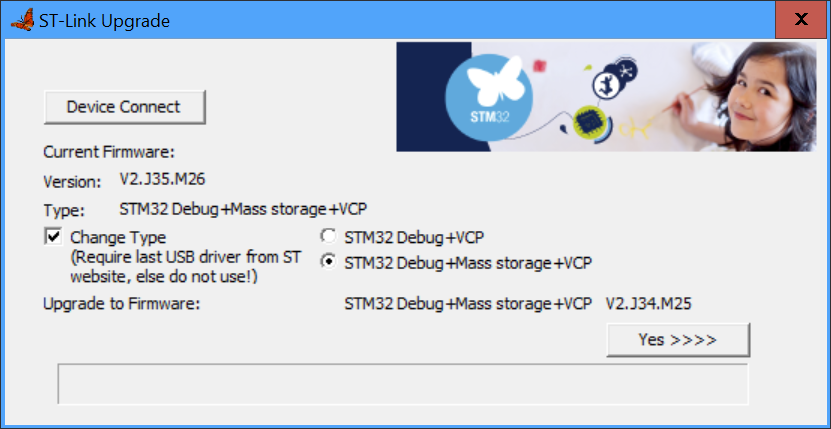
3.1.2. Second step
- Check Converting ST-LINK On-Board Into a J-Link
- Use
STLinkReflash.exeto convert NUCLEO from ST-Link on-board to J-Link on-board.STM32 Debug+ VCPwon´t be detected by Segger reflash utility.
3.2. Some SEGGER tools in short
- Download J-Link Software and Documentation Pack and install.
- You may need to add
C:\Program Files\SEGGER\JLinkto the %PATH% variable.
- You may need to add
- Tested with NUCLEO64-STM32F030R8 evaluation board.
- For example: Compile and flash
../examples/F030_instproject.- Check in ../examples/F030_inst/Core/Inc/triceConfig.h if
#define TRICE_RTT_CHANNEL 0is set as output option.
- Check in ../examples/F030_inst/Core/Inc/triceConfig.h if
3.2.1. JLink.exe
JLink.exeis the SEGGER J-Link commander. It starts the J-Link driver/server and one can connect to it- Info found here:
- J-Link Commander can be started with different command line options for test and automation
- purposes. In the following, the command line options which are available for J-Link
- Commander are explained. All command line options are case insensitive.
- Command Explanation
- -AutoConnect Automatically start the target connect sequence
- -CommanderScript Passes a CommandFile to J-Link
- -CommandFile Passes a CommandFile to J-Link
- -Device Pre-selects the device J-Link Commander shall connect to
- -ExitOnError Commander exits after error.
- -If Pre-selects the target interface
- -IP Selects IP as host interface
- -JLinkScriptFile Passes a JLinkScriptFile to J-Link
- -JTAGConf Sets IRPre and DRPre
- -Log Sets logfile path
- -RTTTelnetPort Sets the RTT Telnetport
- -SelectEmuBySN Connects to a J-Link with a specific S/N over USB
- -SettingsFile Passes a SettingsFile to J-Link
- -Speed Starts J-Link Commander with a given initial speed
- Documentation: https://kb.segger.com/J-Link_Commander
- If you run successful
jlink -device STM32F030R8 -if SWD -speed 4000 -autoconnect 1the target is stopped.- To let in run you need manually execute
goas command in the open jlink window. - To automate that create a text file named for example
jlink.gocontaining thegocommand:echo go > jlink.goand do ajlink -device STM32F030R8 -if SWD -speed 4000 -autoconnect 1 -CommandFile jlink.go
- To let in run you need manually execute
- It is possible to see some output with Firefox (but not with Chrome?) for example:
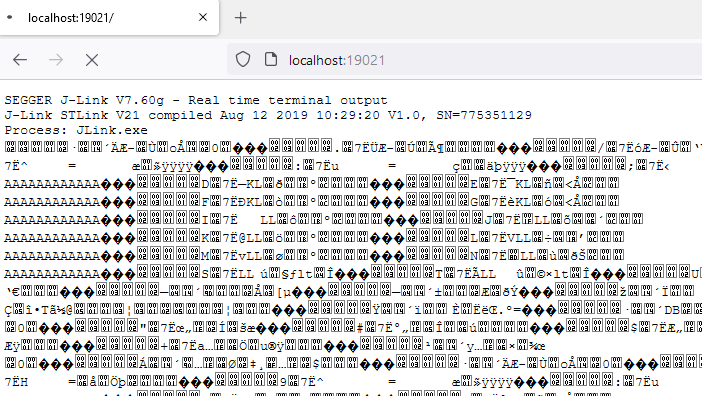 .
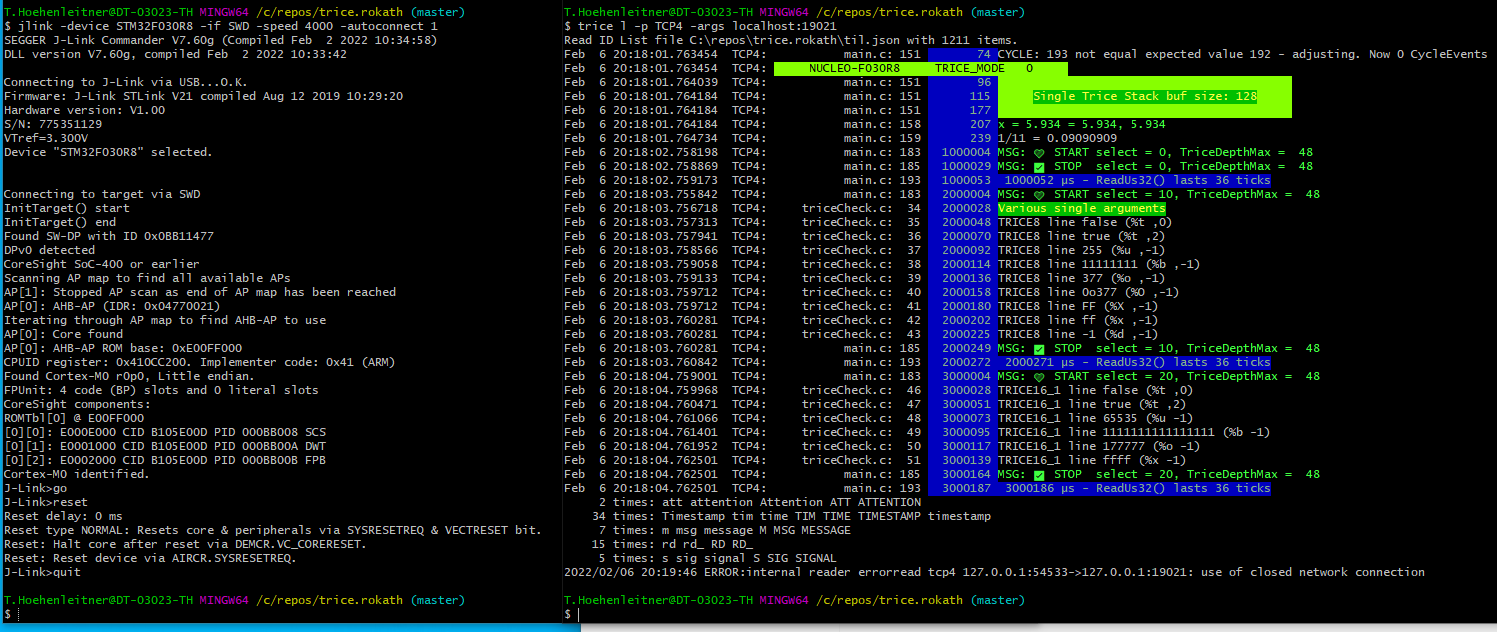
. - After closing the Firefox the Trice tool can connect to it too:
- Open a commandline and run:
trice log -port TCP4 -args localhost:19021- Trice output is visible
- With
halt andgo inside the Jlink window the MCU can get haltes and released - It is possible in parallel to debug-step with a debugger (tested with ARM-MDK)
- Open a commandline and run:
- PLUS:
- Works reliable.
- No file interface needed.
- Trice can connect over TCP localhost:19021 and display logs over RTT channel 0.
- The open
jlinkCLI can be handy to control the target:[r]eset, [g]o. [h]alt - No need to restart the Trice tool after changed firmware download.
- MINUS:
- Uses RTT up-channel 0 and therefore RTT up-channel 0 is not usable differently.
- No down-channel usable.
- Needs a separate manual start of the
jlinkbinary with CLI parameters.- I would not recommend to automate that too, because this step is needed only once after PC power on.
3.2.2. JLinkRTTLogger.exe
JLinkRTTLogger.exeis a CLI tool and connects via the SEGGER API to the target. It is usable for writing RTT channel 0 data from target into a file.- PLUS:
- Works reliable.
- Is automatable.
- Create file with raw log data:
JLinkRTTLogger.exe -Device STM32F030R8 -if SWD -Speed 4000 -RTTChannel 0 triceRaw.log- It is possible to evaluate this file offline:
trice l -p FILE -args triceRaw.log 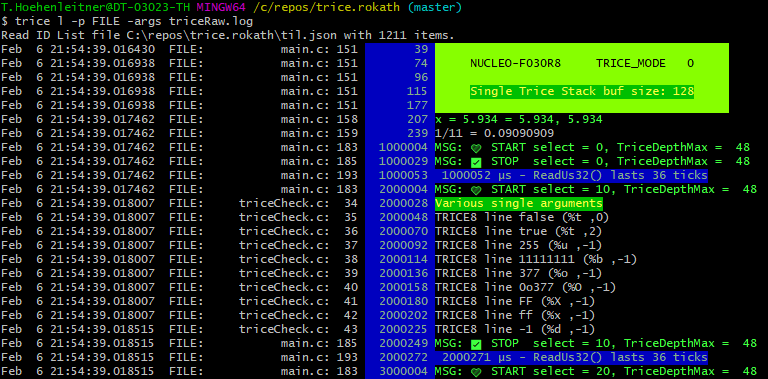
- It is possible to evaluate this file offline:
- No need to restart the Trice tool after changed firmware download.
- MINUS:
- Logs in a file, so the Trice tool needs to read from that file.
- Maybe cannot write in a file as background process on Darwin (macOS).
- The Trice tool can watch the output file and display the Trices: `trice log -port JLINK -args “-Device STM32F030R8 -if SWD -Speed 4000 -RTTChannel 0”
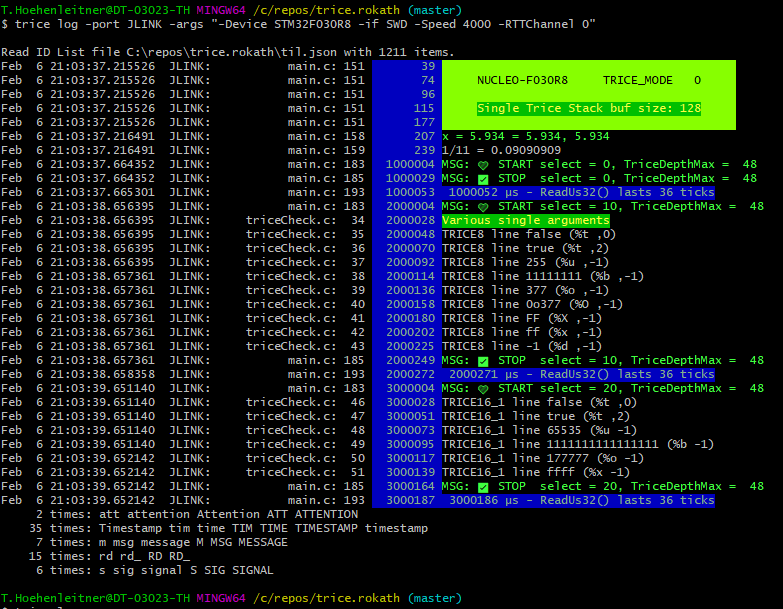
3.3. JLinkRTTClient.exe
JLinkRTTClient.execan be used for simple text transmitting to the target, it also displays strings from target coming over channel 0. It is not used by the Trice tool.- PLUS:
- Target stimulation with proprietary protocol over RTT down-channel 0 possible.
- MINUS:
- Unfortunately it cannot run separately parallel to stimulate the target with any proprietary protocol because it connects to localhost:19021 and therefore blockades the only one possible connection.
- PLUS:
3.4. JLinkRTTViewer.exe
JLinkRTTViewer.exeis a GUI tool and connects via the SEGGER API to the target. It expects ASCII codes and is not used by the Trice tool. The switching between the 16 possible terminals is done viaFF 00…FF 0F. These byte pairs can occur inside the Trice data.
4. Segger RTT
- The main advantages are:
- Speed
- No
TriceTransfer()nor any interrupt is needed in the background - No UART or other output is needed
- This is, because automatically done by SeggerRTT. This way one can debug code as comfortable as with
printf()but with all the TRICE advantages. Have a look here: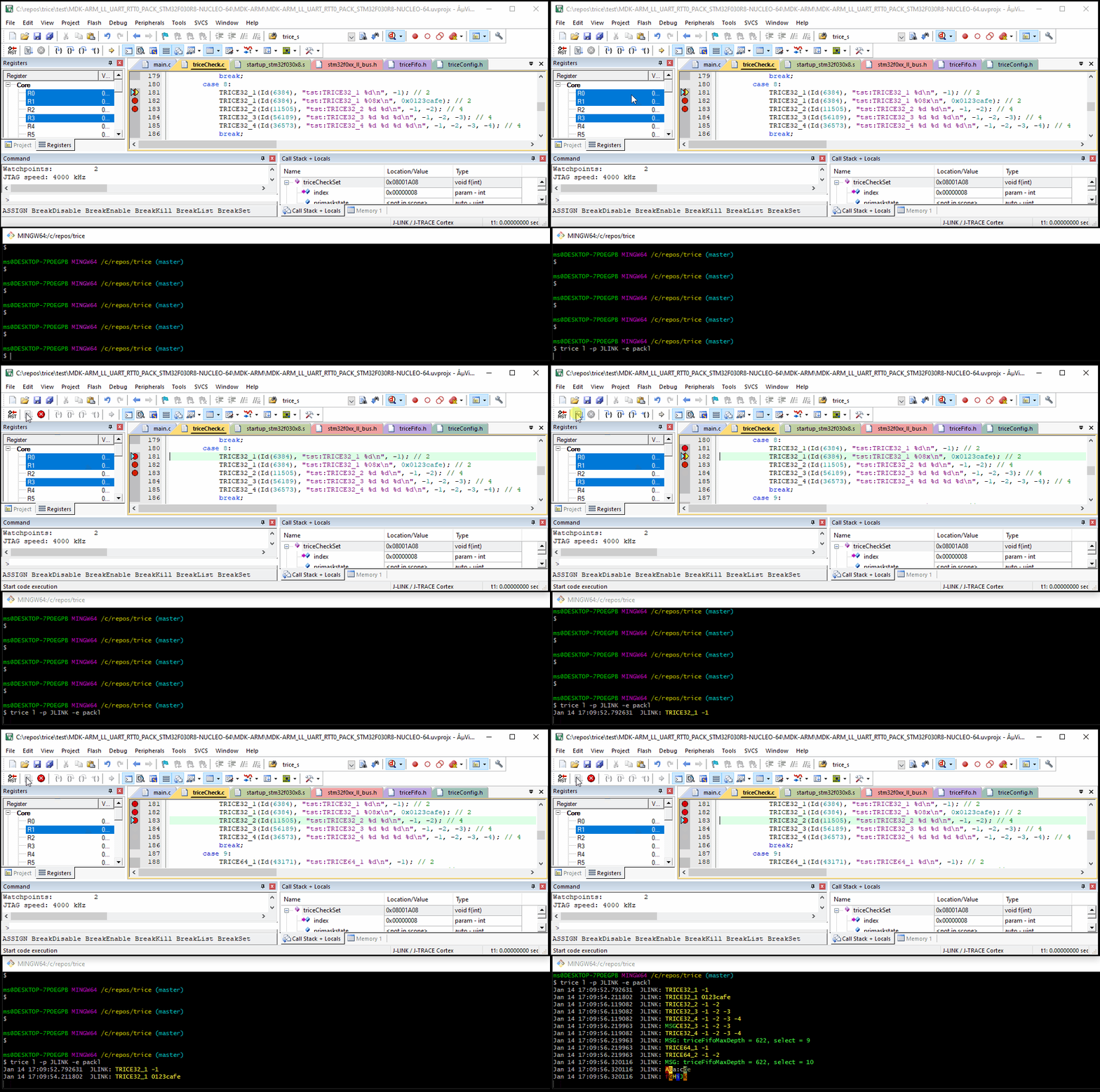
- Avoid Trice buffering inside target and write with TRICE macro directly into the RTT buffer (direct Trice mode =
#define TRICE_MODE 0inside triceConfig.h). -
Write the bytes per Trice directly (little time & some space overhead on target, but no changes on host side)

5. Segger J-Link SDK (~800 EUR) Option
- Segger offers a SeggerRTT SDK which allows to use more than just channel 0 and you can develop your own tooling with it.
- The
trice -port JLINKis ok for usage as is right now. However if you wish more comfort check here: - To select another RTT channel over TELNET, use the
RTTChconfiguration string. - The main Segger J-Link SDK disadvantage beside closed source and payment is: One is not allowed to distribute binaries written with the SDK. That makes it only interesting for company internal automatization.
6. Additional Notes (leftovers)
Downloading RTT target packagefrom https://www.segger.com/products/debug-probes/j-link/technology/about-real-time-transfer/.- Read the manual UM08001_JLink.pdf.
- The current RTT target sources are included in
src; their origin and configuration are described in Trice over RTT. The stored SEGGER_RTT_V812a.zip is an older reference snapshot, not the current library. - Add
SEGGER_RTTI.cto target project
7. Further development
- Check OpenOCD!
- Use OpenOCD and its built-in RTT feature. OpenOCD then starts a server on localhost:17001 where it dumps all RTT messages.
- The GoST project offers a way bypassing JLINK. Used -port STLINK instead.
- Maybe
libusbtogether withlibjaylinkoffer some options too. - Checkout https://github.com/deadsy/jaylink.
-
"C:\Program Files (x86)\SEGGER\JLink\JMem.exe"shows a memory dump. - Go to https://libusb.info/
- -> Downloads -> Latest Windows Binaries
- extract
libusb-1.0.23(or later version)
libusb-1.0.23\examples\bin64> .\listdevs.exe
2109:2811 (bus 2, device 8) path: 6
1022:145f (bus 1, device 0)
1022:43d5 (bus 2, device 0)
0a12:0001 (bus 2, device 1) path: 13
1366:0105 (bus 2, device 10) path: 5
- Repeat without connected Segger JLink
libusb-1.0.23\examples\bin64> .\listdevs.exe
2109:2811 (bus 2, device 8) path: 6
1022:145f (bus 1, device 0)
1022:43d5 (bus 2, device 0)
0a12:0001 (bus 2, device 1) path: 13
- In this case
1366:0105 (bus 2, device 10) path: 5is missing, sovid=1366,did=0105as example - On Windows install WSL2. The real Linux kernel is needed for full USB access.
8. NUCLEO-F030R8 example
Info: https://www.st.com/en/evaluation-tools/nucleo-F030r8.html
8.1. RTT with original on-board ST-LINK firmware
#define TRICE_RTT_CHANNEL 0:- If you use a NUCLEO-F030R8 with the original ST-Link on board after firmware download enter:
trice l -p ST-LINK -args "-Device STM32F030R8 -if SWD -Speed 4000 -RTTChannel 0 -RTTSearchRanges 0x20000000_0x2000". After pressing the reset button output becomes visible: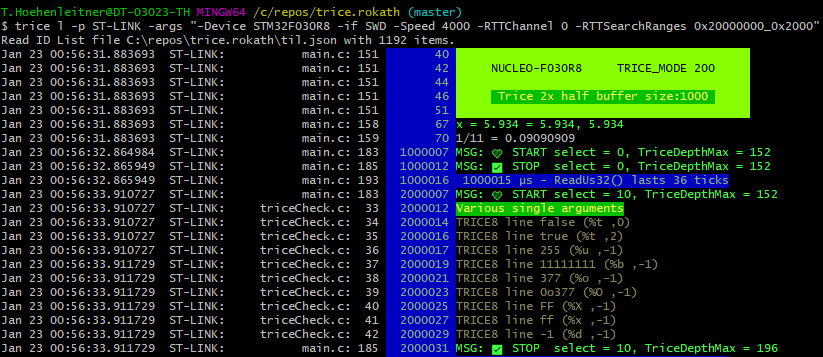
- It works with both ST-Link variants (with or without mass storage device.)
8.2. Change to J-LINK onboard firmware
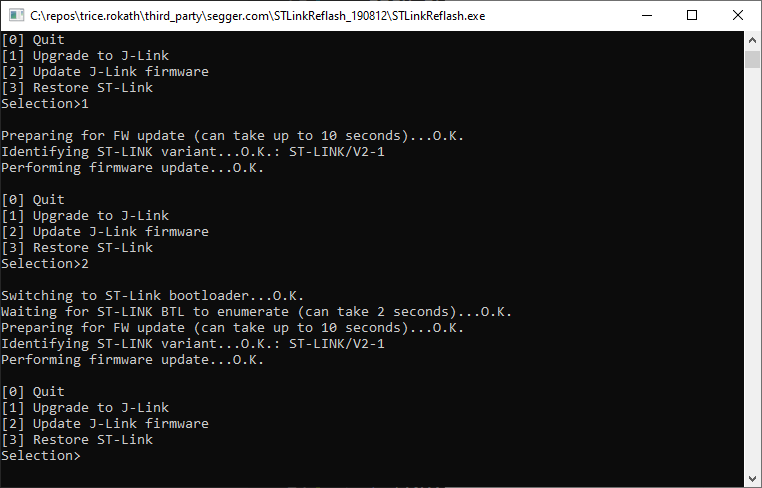
8.3. RTT with J-LINK firmware on-board
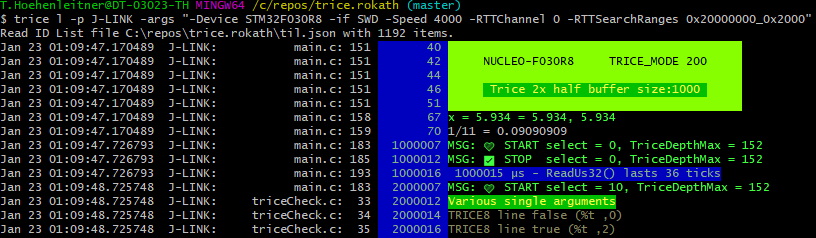
- Observations:
- When pressing the black reset button, you need to restart the Trice tool.
- When restarting the Trice tool, a target reset occurs.
- Other channel numbers than
0seam not to work for some reason.
9. Possible issues
- These boards seem not to work reliable with RTT over J-Link on-board firmware.
- NUCLEO-G071RB
- NUCLEO_G031K8
- After flashing back the ST-LINK OB firmware with the SEGGER tool, it is recommended to use the ST tool to update the ST-LINK OB firmware. Otherwise issues could occur.
10. OpenOCD with Darwin (macOS)
- OpenOCD on macOS works out of the box after installing it.
- When using VS code with Cortex-Debug you cannot use OpenOCD at the same time.
- The
openocd.cfgfile is taylored to the flashed on-board J-Link adapter.
Terminal 1:
brew install open-ocd
...
cd ./trice/examples/G0B1_inst
openocd -f openocd.cfg
Open On-Chip Debugger 0.12.0
Licensed under GNU GPL v2
For bug reports, read
    http://openocd.org/doc/doxygen/bugs.html
srst_only separate srst_nogate srst_open_drain connect_deassert_srst

Info : Listening on port 6666 for tcl connections
Info : Listening on port 4444 for telnet connections
Info : J-Link STLink V21 compiled Aug 12 2019 10:29:20
Info : Hardware version: 1.00
Info : VTarget = 3.300 V
Info : clock speed 2000 kHz
Info : SWD DPIDR 0x0bc11477
Info : [stm32g0x.cpu] Cortex-M0+ r0p1 processor detected
Info : [stm32g0x.cpu] target has 4 breakpoints, 2 watchpoints
Info : starting gdb server for stm32g0x.cpu on 3333
Info : Listening on port 3333 for gdb connections
Info : rtt: Searching for control block 'SEGGER RTT'
Info : rtt: Control block found at 0x20001238
Info : Listening on port 9090 for rtt connections
Channels: up=1, down=0
Up-channels:
0: Terminal 1024 0
Down-channels:

Info : Listening on port 6666 for tcl connections
Info : Listening on port 4444 for telnet connections
Terminal 2:
ms@MacBook-Pro G0B1_inst % trice l -p TCP4 -args localhost:9090  -pf none -d16
Nov 14 17:32:33.319451  TCP4:       triceExamples.c    10        0_000  Hello! 👋🙂
Nov 14 17:32:33.319463  TCP4:
Nov 14 17:32:33.319463  TCP4:         ✨✨✨✨✨✨✨✨✨✨✨✨✨✨✨✨✨
Nov 14 17:32:33.319463  TCP4:         🎈🎈🎈🎈  NUCLEO-G0B1RE   🎈🎈🎈🎈
Nov 14 17:32:33.319463  TCP4:         🍃🍃🍃🍃🍃🍃🍃🍃🍃🍃🍃🍃🍃🍃🍃🍃🍃
Nov 14 17:32:33.319463  TCP4:
Nov 14 17:32:33.319463  TCP4:
Nov 14 17:32:33.406455  TCP4:       triceExamples.c    16        0_037 2.71828182845904523536 <- float number as string
Nov 14 17:32:33.505116  TCP4:       triceExamples.c    17        0_087 2.71828182845904509080 (double with more ciphers than precision)
Nov 14 17:32:33.607518  TCP4:       triceExamples.c    18        0_117 2.71828174591064453125 (float  with more ciphers than precision)
Nov 14 17:32:33.707851  TCP4:       triceExamples.c    19        0_146 2.718282 (default rounded float)
Nov 14 17:32:33.807685  TCP4:       triceExamples.c    20        0_175 A Buffer:
Nov 14 17:32:33.908202  TCP4:       triceExamples.c    21        0_204 32 2e 37 31 38 32 38 31 38 32 38 34 35 39 30 34 35 32 33 35 33 36
Nov 14 17:32:34.007148  TCP4:       triceExamples.c    22        0_254 31372e32  31383238  34383238  34303935  35333235
...
Nov 14 17:32:35.112304  TCP4:       triceExamples.c    24              100 times a 16 byte long Trice messages, which not all will be written because of the TRICE_PROTECT:
Nov 14 17:32:35.307567  TCP4:       triceExamples.c    26        0_379 i=44444400 aaaaaa00
Nov 14 17:32:35.408257  TCP4:       triceExamples.c    27    0,000_002 i=44444400 aaaaaa00
Nov 14 17:32:35.509022  TCP4:       triceExamples.c    26        0_441 i=44444401 aaaaaa01
Nov 14 17:32:35.609439  TCP4:       triceExamples.c    27    0,000_002 i=44444401 aaaaaa01
Nov 14 17:32:35.710201  TCP4:       triceExamples.c    26        0_504 i=44444402 aaaaaa02
...
11. SEGGER J-Link on Darwin (macOS)
RTT was manually verified on macOS with a G0B1 evaluation board whose on-board debug probe was flashed with J-Link OB firmware. This hardware result covers that J-Link setup. OpenOCD uses the separate macOS procedure; the J-Link result does not establish the OpenOCD path.
When repeating a hardware check, record the board, probe firmware, macOS and SEGGER tool versions together with the observed Trice output. Native compiler and CI tests complement this result but do not replace a real probe/board run.
12. Links
- USB over WSL2? (Maybe intersting for OpenOCD)
- https://kickstartembedded.com/2024/03/26/openocd-one-software-to-rule-debug-them-all/?amp=1
- https://mcuoneclipse.com/2021/10/03/visual-studio-code-for-c-c-with-arm-cortex-m-part-9-rtt/