Stamps and Time Measurements
Contents
- Each Trice message can carry stamp bits, which are free usable like for time, addressing or filtering.
- By selecting the letter case (trice, Trice, TRice) you decide for each single Trice macro about the stamp size.
-
Default notation (function call):
notation stamp size remark trice( iD(n), "...", ...);0-bit no stamp at all, shortest footprint Trice( iD(n), "...", ...);16-bit calls internally uint16_t TriceStamp16( void )for trice message stampingTRice( iD(n), "...", ...);32-bit calls internally uint32_t TriceStamp32( void )for trice message stamping -
No upper case macro, like
TRICE_Sworks with the internaliD(n)macro. They needid(n),Id(n)orID(n). See next table. -
Legacy notation (code inlining):
notation stamp size remark TRICE( id(n), "...", ...)0-bit no stamp at all, shortest footprint TRICE( Id(n), "...", ...)16-bit calls internally uint16_t TriceStamp16( void )for trice message stampingTRICE( ID(n), "...", ...)32-bit calls internally uint32_t TriceStamp32( void )for trice message stamping
It is up to the user to provide the functions TriceStamp16 and/or TriceStamp32. Normally they return a µs or ms tick count but any values are allowed.
💡 Tip: Reduce target work by transmitting raw hardware counter values. The stamp function can read the hardware counter directly; the host then normalizes the count direction, reconstructs wraps, and converts units. Moving this arithmetic off the target can significantly reduce CPU work, especially inside interrupt handlers, and shorten interrupt execution time. See Stamp expressions and continuous counters for the conversion examples and the
unwrapreference for its parameters, state changes, and sampling requirements.
The PC feature tour makes this distinction visible without hardware: its 16-bit stamp is a sample phase, while its 32-bit stamp counts milliseconds. The matching G0B1 feature tour uses the board’s own timers.
1. Target (Time)Stamps Formatting
To get a short overview run trice help -log and read about the CLI switches ts, ts0, ts16, ts32, ts0delta, ts16delta, ts32delta in the generated CLI help file. The ts32 switch supports also “epoch” now as format. That is useful for example, if the binary logs are stored internally in the device flash and read out later. Such usage assumes 1 second as ts32 unit in uint32_t format and the Trice tool displays the UTC time. It is also possible to adapt the displayed format like this for example: trice log -ts32='epoch"06-01-02_15:04:05"'. The additional passed string must match the Go time package capabilities. A few examples:
trice log -port FILEBUFFER -args myLogs.bin -ts32='"Mon Jan _2 15:04:05 2006"'             # ANSIC
trice log -port FILEBUFFER -args myLogs.bin -ts32='"Mon Jan _2 15:04:05 MST 2006"'         # UnixDate
trice log -port FILEBUFFER -args myLogs.bin -ts32='"Mon Jan 02 15:04:05 -0700 2006"'       # RubyDate
trice log -port FILEBUFFER -args myLogs.bin -ts32='"02 Jan 06 15:04 MST"'                  # RFC822
trice log -port FILEBUFFER -args myLogs.bin -ts32='"02 Jan 06 15:04 -0700"'                # RFC822Z     (RFC822 with numeric zone)
trice log -port FILEBUFFER -args myLogs.bin -ts32='"Monday, 02-Jan-06 15:04:05 MST"'       # RFC850
trice log -port FILEBUFFER -args myLogs.bin -ts32='"Mon, 02 Jan 2006 15:04:05 MST"'        # RFC1123
trice log -port FILEBUFFER -args myLogs.bin -ts32='"Mon, 02 Jan 2006 15:04:05 -0700"'      # RFC1123Z    (RFC1123 with numeric zone)
trice log -port FILEBUFFER -args myLogs.bin -ts32='"2006-01-02T15:04:05Z07:00"'            # RFC3339
trice log -port FILEBUFFER -args myLogs.bin -ts32='"2006-01-02T15:04:05.999999999Z07:00"'  # RFC3339Nano
trice log -port FILEBUFFER -args myLogs.bin -ts32='"3:04PM"'                               # Kitchen
After the year 2106 the Trice tool needs a small modification to correctly compute the epoch time then. Probably I will not be alive anymore to do that then, but, hey, Trice is Open Source!
2. Target (Time)Stamp Delta Columns
trice can display target timestamps not only as absolute values, but also as deltas to the previous target timestamp of the same size. For that purpose the CLI provides three additional switches:
-ts0delta-ts16delta-ts32delta
These switches are delta variants of -ts0, -ts16, and -ts32. All three default to "", which means disabled.
2.1. Purpose
The delta switches add a second, independent timestamp column. This makes it possible to show:
- only absolute timestamps
- only delta timestamps
- both absolute and delta timestamps side by side
- differently formatted absolute and delta columns
This is useful when absolute time is needed for long-term orientation, while delta time is needed for short-term timing analysis.
2.2. General Behavior
-ts16delta and -ts32delta behave like the corresponding absolute timestamp switches, except that they print the difference to the previous timestamp of the same type:
-ts16deltaprintscurrent ts16 - previous ts16-ts32deltaprintscurrent ts32 - previous ts32
Wraparound is handled naturally:
- 16-bit deltas wrap modulo
2^16 - 32-bit deltas wrap modulo
2^32
If no previous timestamp of that type exists yet, the delta column shows an aligned placeholder:
- for simple numeric formats like
dt:%6d, the placeholder is- - for built-in delta formats like
"us"or"ms", the placeholder is blank space with the same display width as later delta values
-ts0delta does not calculate a delta value. It exists only to generate a matching placeholder column for trices without target timestamps, so absolute and delta columns can stay aligned independently.
An explicitly passed empty delta switch is treated as a hard disable for that stamp size:
-ts16delta ""means no delta output and no auto-placeholder on 16-bit stamp lines-ts32delta ""means no delta output and no auto-placeholder on 32-bit stamp lines-ts0delta ""means no delta placeholder on no-stamp lines
2.3. Column Order
When both absolute and delta timestamps are enabled, the output order is:
- absolute timestamp column
- delta timestamp column
- message text
This applies independently for ts0, ts16, and ts32.
2.4. Independence from -ts
The general switch -ts still sets defaults only for:
-ts0-ts16-ts32
It does not set defaults for:
-ts0delta-ts16delta-ts32delta
Delta columns are therefore always explicit and opt-in.
2.5. Formatting Rules
The delta switches use the same general formatting logic as the corresponding absolute timestamp switches, but independently from them. Examples:
-ts16delta="ms"-ts32delta="time:%8d"-ts16delta="dt:%6d"
This means the absolute column and the delta column can use different formats and widths.
For the first delta value, trice prints the same aligned placeholder behavior described above: - for simple numeric directives, blank space for the built-in "us"/"ms" delta formats.
2.6. Special Case: -ts32 epoch
-ts32 supports epoch-based formatting for absolute 32-bit timestamps, for example:
-ts32=epoch
-ts32=epoch2006-01-02 15:04:05 UTC
This is intended only for absolute timestamps.
For -ts32delta, the input values are still treated as plain numeric 32-bit values, and the delta is computed from those raw values before any epoch formatting would apply. Therefore -ts32delta accepts numeric formats, not epoch formats.
Typical usage with epoch-based absolute timestamps is:
trice log -ts32=epoch -ts32delta="dt:%8d"
Here the absolute column shows human-readable UTC time, while the delta column shows the difference in seconds between consecutive 32-bit timestamps.
2.7. Automatic -ts0delta Placeholder
If -ts0delta is not passed explicitly at all, trice can derive it automatically from the active delta formats.
The generated placeholder is blank space with the width of the widest active -ts16delta or -ts32delta column.
For that width derivation:
- a lowercase-only tag prefix ending with
:such astime:ordt:is treated as cosmetic and ignored - a mixed-case or uppercase tag prefix such as
Time:ortimeStamp:remains part of the width, because that tag text is rendered later too
This mechanism keeps the delta column aligned for messages without target timestamps even when the active delta columns use different widths.
If -ts0delta "" is passed explicitly, this automatic placeholder generation is disabled.
2.8. Typical Use Cases
Show only delta values instead of absolute 16-bit timestamps:
trice log -ts16="" -ts16delta="dt:%6d"
This suppresses absolute ts16 output and shows only the delta to the previous 16-bit timestamp.
Show both absolute and delta 16-bit timestamps in separate columns:
trice log -ts16="t:%6d " -ts16delta="dt:%6d "
Show absolute 32-bit timestamps as UTC epoch time and the delta in seconds:
trice log -ts32=epoch -ts32delta="dt:%8d "
Show absolute timestamps for all messages, but add a delta column only for 32-bit timestamps:
trice log -ts0="time: " -ts16="time:%6d " -ts32=epoch -ts32delta="dt:%8d "
If alignment for messages without target timestamps should follow the delta column too, add -ts0delta explicitly:
trice log -ts0="time: " -ts0delta=" " -ts16="time:%6d " -ts32=epoch -ts32delta="dt:%8d "
Use only a delta column and keep no-stamp lines aligned:
trice log -ts0="" -ts16="" -ts32="" -ts16delta="dt:%6d "
If -ts0delta is omitted, trice derives it automatically from the widest active delta column.
2.9. Example Screenshots
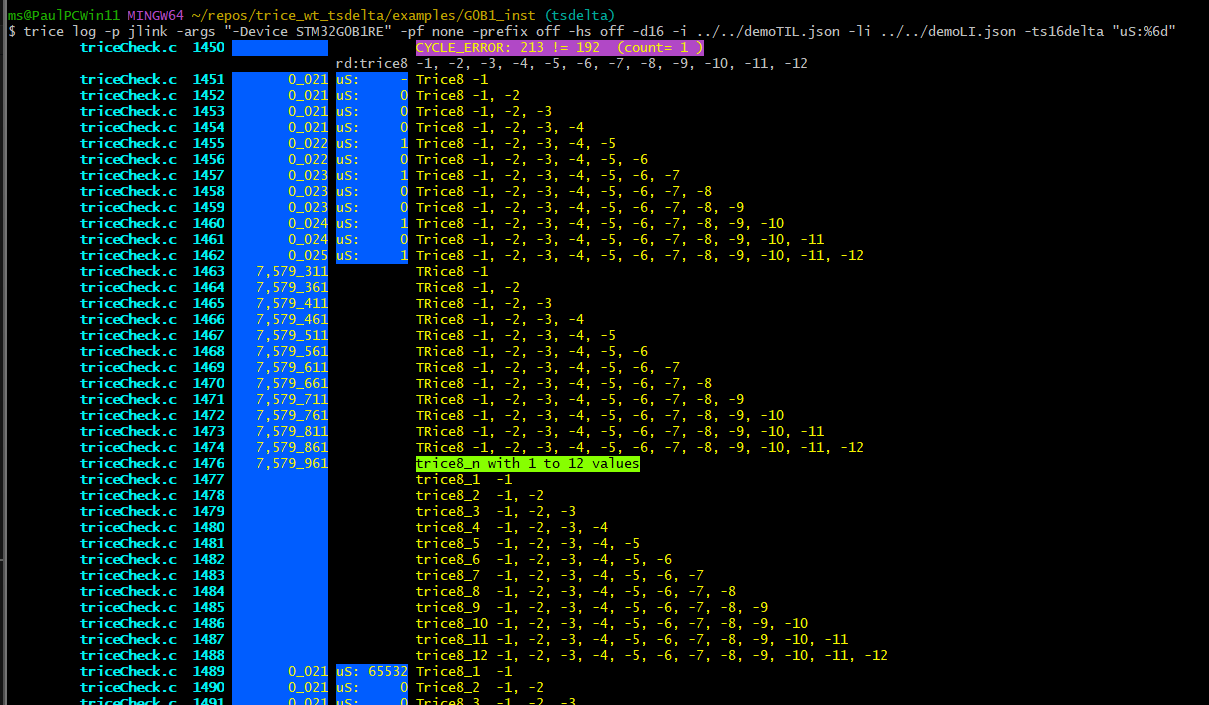
1) Add a column to show just the ts16 delta values (microseconds).
trice log -p jlink -args "-Device STM32G0B1RE" -pf none -prefix off -hs off -d16 -i ../../demoTIL.json -li ../../demoLI.json -ts16delta "uS:%6d"
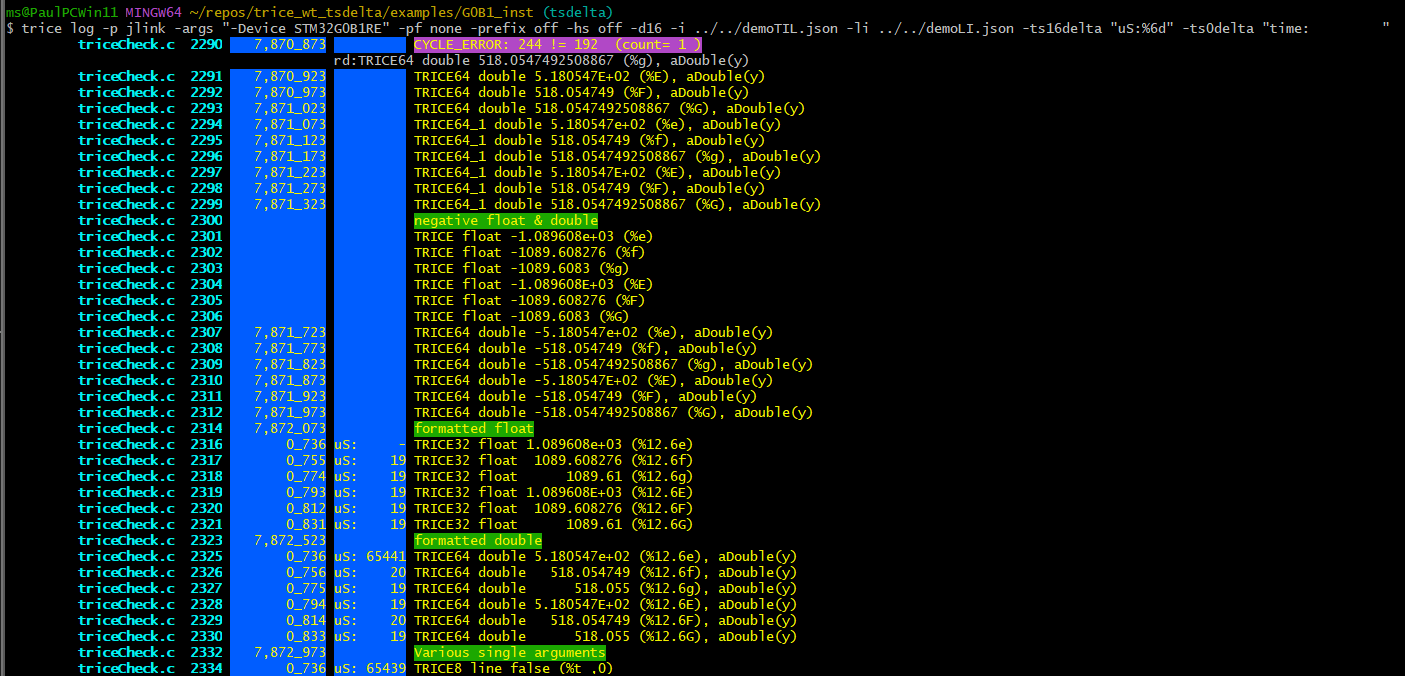
2) Same as 1) but with continuously colored row.
trice log -p jlink -args "-Device STM32G0B1RE" -pf none -prefix off -hs off -d16 -i ../../demoTIL.json -li ../../demoLI.json -ts16delta "uS:%6d" -ts0delta "time: "
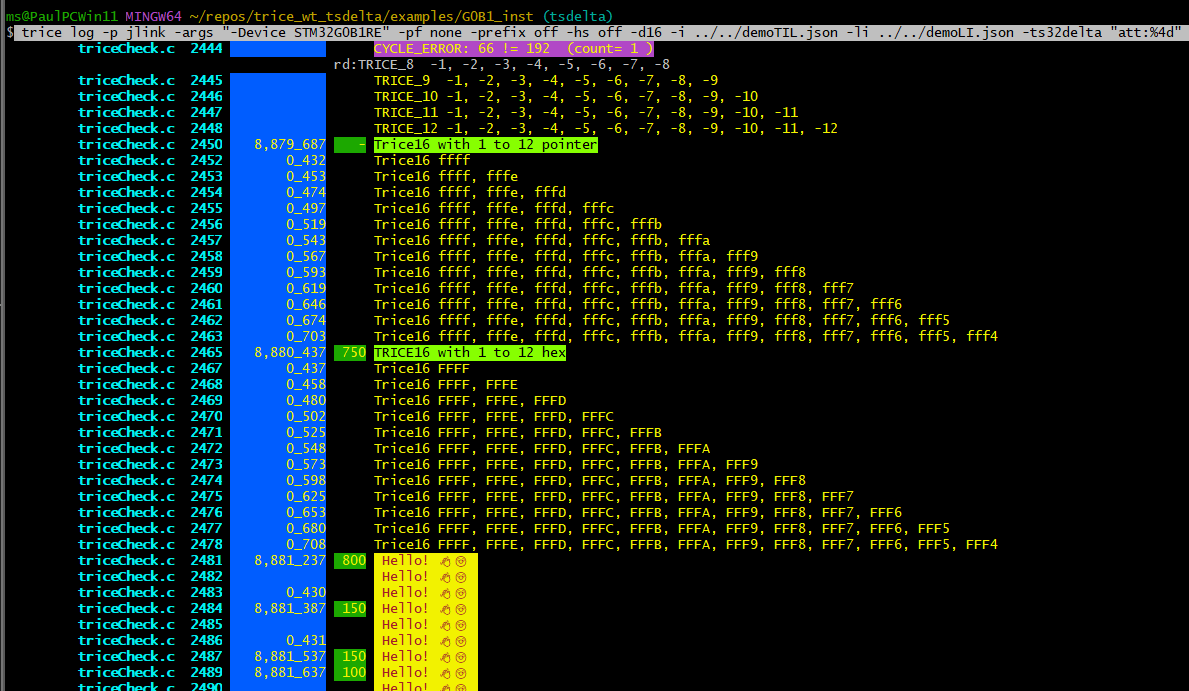
3) Add a column to show just the ts32 delta values (microseconds).
trice log -p jlink -args "-Device STM32G0B1RE" -pf none -prefix off -hs off -d16 -i ../../demoTIL.json -li ../../demoLI.json -ts32delta "att:%4d"
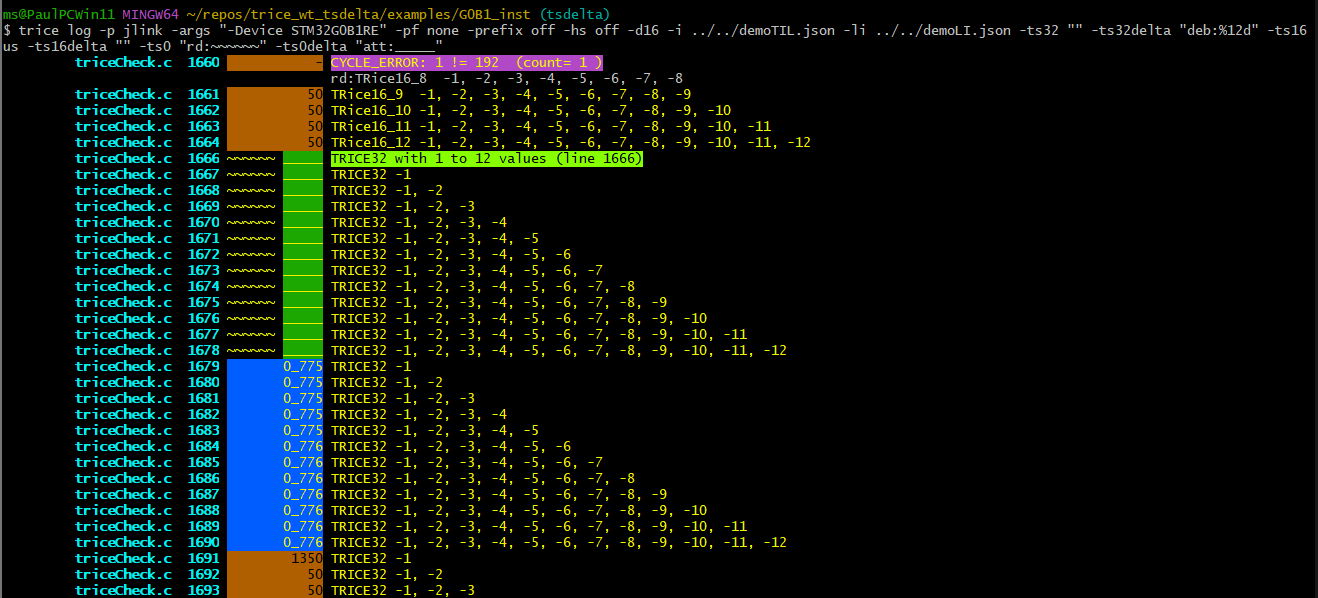
4) Show only ts16 absolute values in microseconds together with ts32delta values. Because -ts16delta "" is passed explicitly, ts16 lines get no delta placeholder. Lines without timestamps are decorated explicitly to show formatting options.
trice log -p jlink -args "-Device STM32G0B1RE" -pf none -prefix off -hs off -d16 -i ../../demoTIL.json -li ../../demoLI.json -ts32 "" -ts32delta "deb:%12d" -ts16 us -ts16delta "" -ts0 "rd:~~~~~~" -ts0delta "att:_____"
5) Show ts16 absolute values together with ts32delta values and explicit no-stamp separators. Again, -ts16delta "" suppresses any automatic placeholder on ts16 lines.
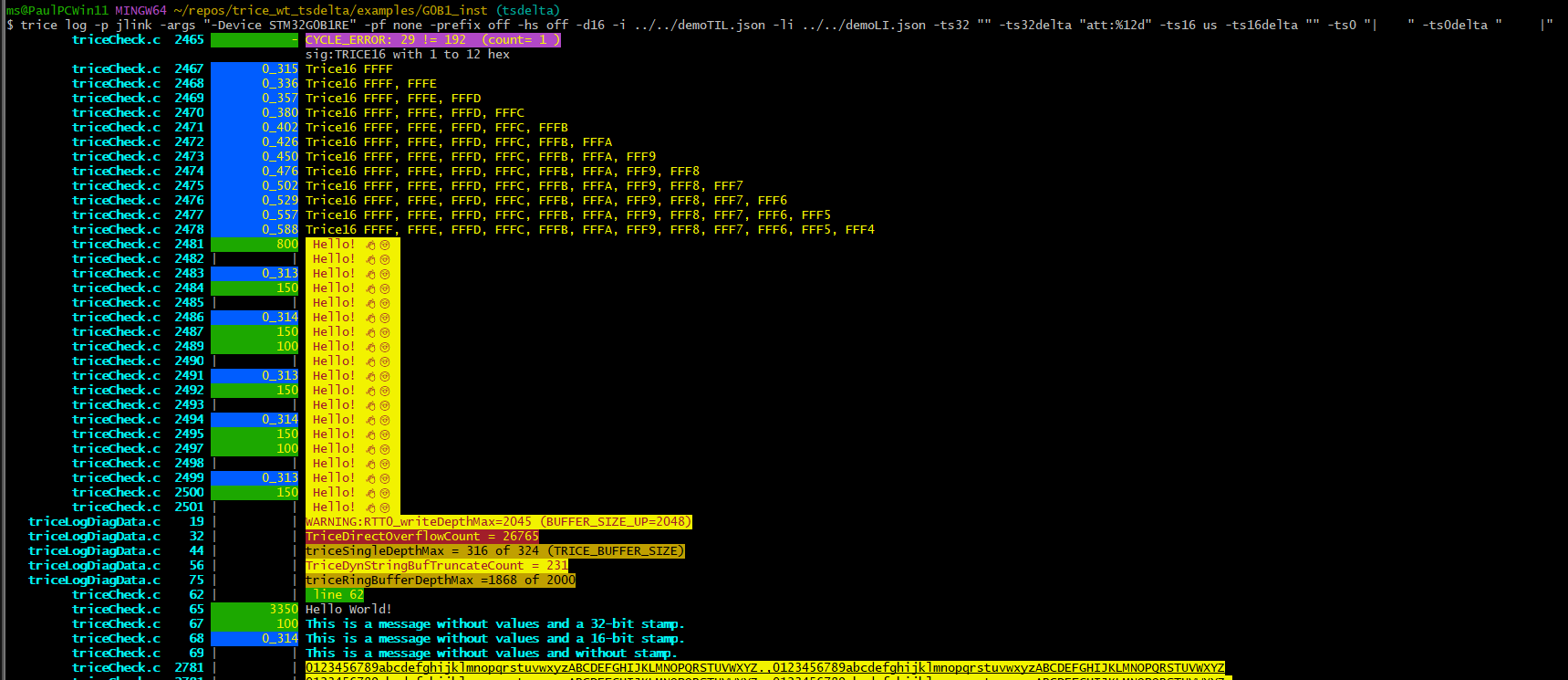
trice log -p jlink -args "-Device STM32G0B1RE" -pf none -prefix off -hs off -d16 -i ../../demoTIL.json -li ../../demoLI.json -ts32 "" -ts32delta "att:%12d" -ts16 us -ts16delta "" -ts0 "| " -ts0delta " |"
6) Show ts32 as epoch followed by ts32delta in seconds. (Hint: In translator.go inside function formatTargetStamp32 the call of correctWrappedTimestamp(uint32(timestamp)) was temporarily deactivated for this check)
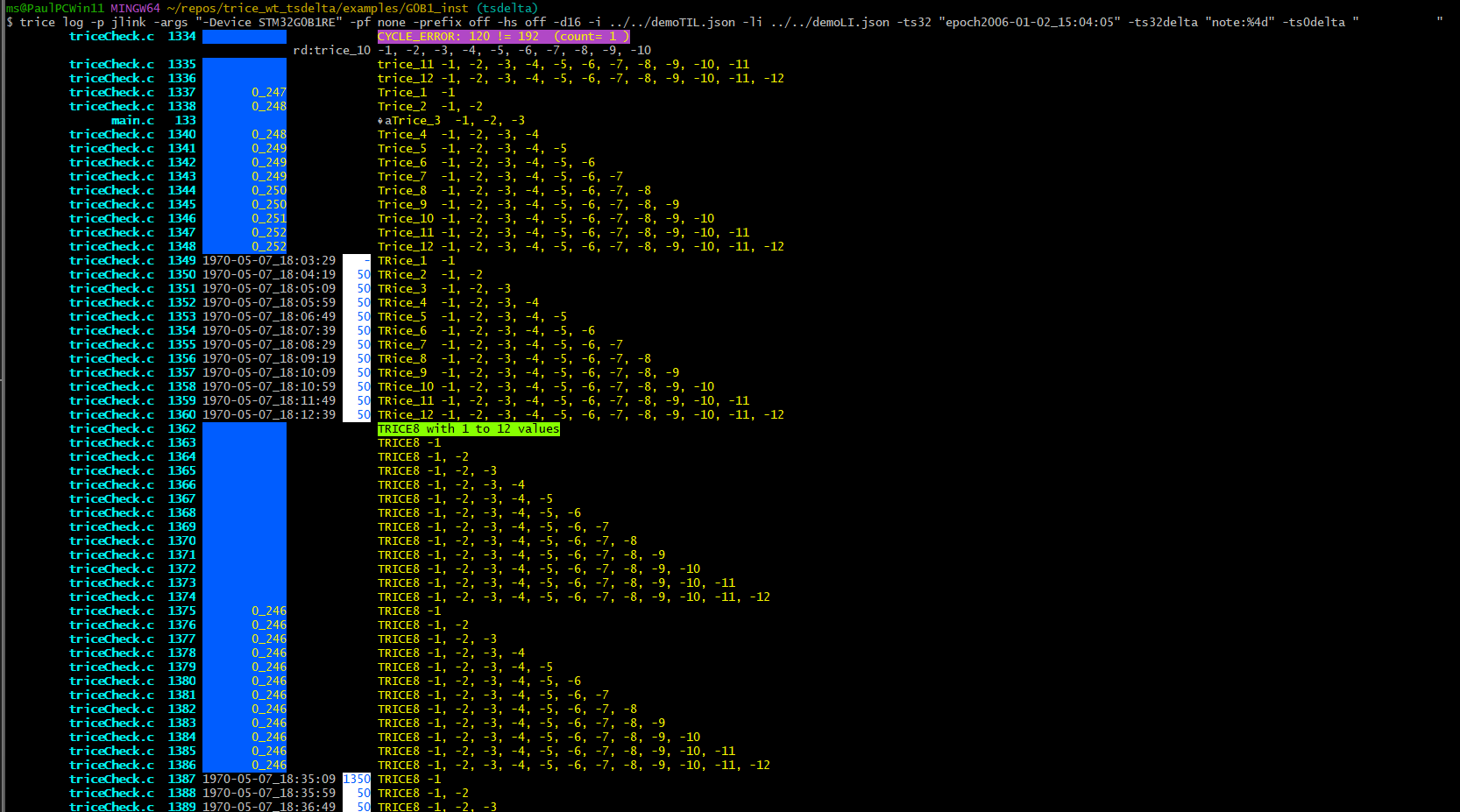
trice log -p jlink -args "-Device STM32G0B1RE" -pf none -prefix off -hs off -d16 -i ../../demoTIL.json -li ../../demoLI.json -ts32 "epoch2006-01-02_15:04:05" -ts32delta "note:%4d" -ts0delta " "
7) Like 6 but additionally show ts16delta in microseconds
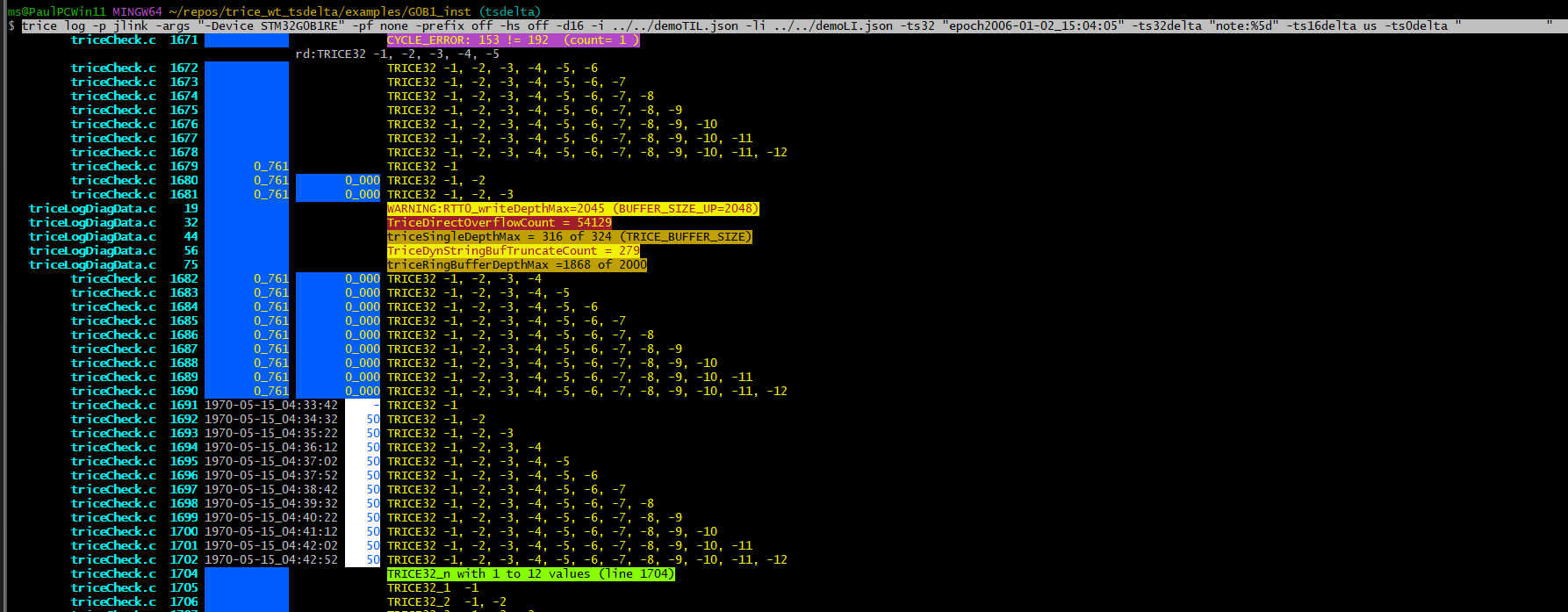
trice log -p jlink -args "-Device STM32G0B1RE" -pf none -prefix off -hs off -d16 -i ../../demoTIL.json -li ../../demoLI.json -ts32 "epoch2006-01-02_15:04:05" -ts32delta "note:%5d" -ts16delta us -ts0delta " "
2.10. Summary
The tsdelta switches make timestamp display more flexible by separating:
- absolute time representation
- delta time representation
- alignment of messages without target timestamps
This allows trice output to be tailored for debugging, profiling, timing analysis, and mixed absolute/delta log views without changing the target-side encoding.
3. Target Trice Stamps
-
If you wish to have your Trice messages stamped, most probably time stamped, add the 2 hardware specific macros/functions to your project (example in ./examples/F030_inst/Core/Inc/triceConfig.h and ./examples/F030_inst/Core/Src/stm32f0xx_it.c ). The time base is in your hands and is allowed to be different for the 16-bit and 32-bit stamps. Example:
//! ms32 is a 32-bit millisecond counter, counting circularly in steps of 1 every ms. extern uint32_t ms32; #define TriceStamp16 (SysTick->VAL) // Counts from 31999 -> 0 in each ms. #define TriceStamp32 ms32 - In the code snippet above the 32-bit timestamp is used for milliseconds and the 16.bit timestamp is used as clock counter what allows fine grained time measurements.
-
In the screenshot below, the 16-bit timestamp is a parallel counter running between 0-9999 milliseconds, which allows 16-bit timestamps all the time and only every 10 seconds is a full 32-bit timestamp needed.

- The trice tool
-ts*CLI switches allow customization. With-hs offhost time stamps are suppressed. - It is also possible to use the stamp option not for time stamps but for any values, like addresses or a voltage or a random number.
Hint: I usually have the 32-bit timestamp as millisecond counter and the 16-bit timestamp as systick counter to measure short execution times.