Example Projects
Contents
| Project Name | Description | |
|---|---|---|
| F030_bare | This is a minimal STM32CubeMX generated Makefile project adapted to Clang and GCC. It serves as a reference for diff to F030_inst* so see quickly the needed instrumentation steps you need for your own project. |
|
| F030_inst_uart | Recommended starting point when RTT is not the aim | |
| F030_inst_rtt | To use RTT start here | |
| F030_inst | This example shows how to use RTT and serial parallel. | |
| G0B1_bare | This is a minimal FreeRTOS STM32CubeMX generated Makefile project adapted to Clang and GCC. | |
| G0B1_inst | This is a minimal FreeRTOS STM32CubeMX generated Makefile project adapted to Clang and GCC and afterward instrumented with the Trice library. | |
| PC_features | Small PC capture with structured fields, CE, tags, runtime strings, timestamps, and text/JSON/KV decoder scripts. | |
| G0B1_features | A copy of G0B1_inst showing CE task handles from two FreeRTOS tasks and matching decoder scripts. | |
| L432_bare | This is a minimal FreeRTOS STM32CubeMX generated Makefile project extended to compile also with Clang trying to perform minimal changes. It produces some warnings, because it is not finetuned. The L432_inst project is then a next step performable. | |
| L432_inst | This is a minimal FreeRTOS STM32CubeMX generated Makefile project adapted to Clang and GCC and afterward instrumented with the Trice library. | |
1. Minimal PC Demos: Direct and Deferred
The two programs under demo use the same binary output channel in two modes. direct writes each record immediately to build/log.bin; deferred first stores records in a ring buffer and drains it through TriceTransfer(). Both compile the repository’s src directly, without copying a library or requiring a separate build system.
The direct file writer is only a demonstration of when the output callback runs. Writing to a file is far too slow and unpredictable for a typical fast direct-output path: here that work takes place inside the log call. A typical Direct Mode application uses SEGGER RTT, where records are written to a RAM buffer and read through the debug probe. You can debug the firmware and receive immediate log output alongside it. Demonstrating that setup requires a compatible target and debug probe, so it cannot be part of this hardware-free PC introduction. The file demo does not measure Direct Mode performance.
Put trice and a native C compiler in PATH, then use a POSIX shell (Git Bash on Windows). The scripts use cc; change compiler=cc to compiler=gcc if needed:
cd demo/deferred
./run.sh
cd ../direct
./run.sh
The two independent scripts (deferred, direct) are both named run.sh and sit next to their respective main.c. Each binds only that file, compiles one program, runs it and decodes its capture using trice log -p FILEBUFFER. Their comments explain each step. If an extracted source archive has lost the executable permission, use sh ./run.sh in the selected demo folder. No LC_ALL setting is needed. tlog is not required, and the scripts install nothing. The programs are named demo_deferred.exe and demo_direct.exe inside their respective build directories; these filenames work on Windows, Linux and macOS.
Ignoring optional location/prefix columns, the messages are:
Hello from deferred mode.
Deferred value=42.
Hello from direct mode.
Direct value=42.
The layout separates project data from generated outputs:
demo/deferred/run.sh          build, run and decode the deferred demo
demo/deferred/main.c          deferred application
demo/deferred/triceConfig.h   deferred configuration
demo/deferred/til.json        persistent ID-to-format dictionary
demo/deferred/li.json         source locations within this demo
demo/deferred/build/          executable and log.bin
  generated_sidecars/         this demo's sidecars and field registry
demo/direct/run.sh            build, run and decode the direct demo
demo/direct/main.c            direct application
demo/direct/triceConfig.h     direct configuration
demo/direct/til.json          this demo's dictionary
demo/direct/li.json           this demo's locations
demo/direct/build/            executable and log.bin
  generated_sidecars/         this demo's sidecars and field registry
demo/live/run.sh              build and run the live demo
demo/live/main.c              live application
demo/live/triceConfig.h       independent deferred-output configuration
demo/live/til.json            this demo's dictionary
demo/live/li.json             this demo's locations
demo/live/build/              executable and growing log.bin
  generated_sidecars/         this demo's sidecars and field registry
Binding uses til.json and li.json in each project’s folder and -genDir build/generated_sidecars for the generated headers and field registry. No tables, generated headers or configuration files are shared between demos. To reuse a demo, copy its whole folder and adjust only trice_src=../../src in its script to point to your Trice library. The script works regardless of the directory from which you start it. On the first bind, a missing generated #include "trice_sidecar_main_c_...h" is inserted automatically; users neither invent nor maintain its name. Each compiler command includes src/*.c, so there is no individual library source list to maintain. The fallback RTT header is supplied by src/default_conf; no project RTT configuration is needed. Optional compiler checks are commented out. See Trice Project Image Size Optimization if you want to add unused-section removal to these deliberately minimal builds.
Compare direct/main.c and deferred/main.c: the latter explicitly transfers until its ring buffer is empty. Change the value 42 and rerun the corresponding script. Each script spells out the complete workflow so you can follow and modify either example independently.
1.1. Watch a running application
The live application uses its own deferred-output configuration and produces one counter record per second until you stop it. It works without hardware or additional network tools on macOS, Linux and Windows with Git Bash and a native C compiler.
In terminal 1, starting from the repository root:
cd demo/live
./run.sh
The script binds IDs, compiles the application and leaves it running. Once it prints the decoder command, open terminal 2 at the repository root:
cd demo/live
trice log -p FILE -args build/log.bin
You should see the counter advance while the application continues running:
Live counter=0.
Live counter=1.
Live counter=2.
FILE keeps reading when it reaches the current end of the file; FILEBUFFER, used by the short demos above, stops there. The application flushes its file buffer after each transfer so the parallel reader can see the new bytes immediately. The logger first displays any records already in the file, then follows new records.
Stop both terminals with Ctrl+C before restarting. A new application run recreates demo/live/build/log.bin; the capture grows for as long as the application runs. From demo/live, replay the stopped capture with trice log -p FILEBUFFER -args build/log.bin. The decoder finds this project’s own til.json and li.json in the same directory. This is a simple live-logging demonstration, not a timing measurement or a bounded capture system.
2. PC Feature Tour
The PC program emits a short capture.bin for the normal host decoder. It groups Structured Logging, a runtime string, Context Enrichment (CE), tags, an untagged message, a buffer record, and both target-stamp widths in one editable application.
With trice and cc or gcc in PATH, run:
cd examples/PC_features
./build_and_run.sh
./show_text.sh
./show_json.sh
./show_kv.sh
./check_output.sh
The build script binds local IDs and applies -ce 'ctx:", cycle={cycle:%u}", pc_sample_phase'. The shared emit_sample call therefore gains a cycle field without editing its Supply {voltage_mv:%u} format. The device name uses TriceS because CE does not append runtime arguments to string Trices. til.json and li.json are versioned project tables; the capture, executable, and generated headers are build outputs. Rebuild after changing the source or CE rule.
| Feature | Source to edit | Observable result |
|---|---|---|
| Numeric fields and runtime string | emit_sample and the device-name TriceS |
JSON fields.voltage_mv and fields.device; the device is pump A. |
| CE at one shared call site | info:ctx: and pc_sample_phase |
Supply readings contain cycle=7 and cycle=11. |
| Built-in and custom tags | wrn:, dbg:, sensor: |
Warning threshold filters events; sensor has weight 450 in the show scripts. |
| Two stamp widths | TRice16 for Phase, Trice8 for Humidity, and TRice32 for Supply |
Phase has a 32-bit stamp; Humidity has a 16-bit stamp. |
| Stamp delta | Two Supply calls | Second 32-bit stamp is 125 ms, with a 25 ms delta. |
| Untagged message and buffer | Last calls in main |
Message A message without a tag, metadata tag untagged, and bytes 41 00 ff . |
The text, JSON, and KV scripts append your extra arguments to their trice log command:
./show_json.sh -logLevel wrn
./show_text.sh -pick info
./show_json.sh -utag sensor:650 -logLevel wrn
./show_text.sh -tagStat
The first retains Warning and higher weights; the third raises sensor so it also passes that threshold. JSON produces one object per event (NDJSON). Tag statistics count decoded groups, including events hidden by filters. For a complete macro/format corpus see triceCheck.c; for live plotting see the data producers, and for local formatting see the local-log examples.
2.1. Updating the PC Tour’s Output Checks
check_output.sh checks concrete values from main.c, the CE rule, and the show-script options. After editing any of those, rebuild, inspect JSON and KV output, update the corresponding shell case pattern, and run the check again. Keep each check tied to an observable result. If a feature is removed, deliberately replace or remove its assertion rather than leaving a commented-out check and a misleading PASS message.
Macro capitalization chooses stamp width: trice... has no target stamp, Trice... has 16 bits, and TRice... has 32 bits. Changing Trice16(...) to TRice16(...) changes the stamp, not the 16-bit payload value. The -ts16 and -ts32 options change display only. In this tour the 16-bit stamp represents a sample phase; the 32-bit stamp counts milliseconds. Adding stamped events can change subsequent ts16Delta or ts32Delta expectations. JSON displays a source newline as the two characters \n, which shell patterns must match literally.
3. G0B1 Feature Tour
G0B1_features is a direct copy of G0B1_inst with a short tour in its two existing FreeRTOS tasks. The original hardware configuration remains in place; the large TriceCheck loop is omitted to make task records easy to find. Its companion is the hardware-free PC feature tour.
With trice, GNU Make, and the Arm GNU toolchain in PATH:
cd examples/G0B1_features
./demo_build.sh
./check_build.sh
The build script binds this copy and its shared exampleData producers into a private til.json, applying -ce 'ctx:", task={task:%p}", osThreadGetId()'. The call in LogFeatureSample executes from both tasks, so the records have different task handles at the same C call site. The neighboring triceS transports the worker name. Edit Core/Src/main.c to experiment with the named sample and load_pct fields, 16-/32-bit stamps, Warning, untagged text, buffer output, and the custom sensor: tag.
check_build.sh verifies the generated task adapter and the string, field, stamp, tag, and buffer entries; it needs no board. It is a compiler/build check, not evidence that firmware ran on an MCU.
Three scopes matter here: the files selected by Bind, the files compiled by the Makefile, and the functions actually called at runtime. A shared producer can need a sidecar because it is scanned or compiled even when the feature tour never calls its demo function. The current demo_build.sh selects Core/Src and ../exampleData; it does not select _test/testdata/triceCheck.c. A trice_triceCheck_c_... header in a generation directory may therefore come from another or earlier repository-wide Bind run. Its presence alone does not show that this tour runs TriceCheck. Use generate -bindReport with the relevant source selection to inspect references; an absent scan reference is not proof that another build no longer needs the file.
Flash out.gcc/G0B1.elf using the original board setup. In a separate terminal capture RTT channel 0 with J-Link:
mkdir -p temp
JLinkRTTLogger -Device STM32G0B1RE -If SWD -Speed 4000 -RTTChannel 0 temp/trice.bin
Stop the logger once startup records have arrived, then decode the saved capture:
./show_text.sh
./show_json.sh
./show_kv.sh
./show_json.sh -pick info
./show_kv.sh -logLevel wrn
The text, JSON, and KV decoder scripts expect this project’s til.json and accept extra trice log arguments. They use 16-bit stamps as microseconds and 32-bit stamps as milliseconds; JSON is NDJSON. The custom tag has weight 450. Rebuild and recapture after editing calls or CE rules. A board and J-Link are required for capture, but an existing temp/trice.bin can be decoded without hardware.
4. Local Logging Example Projects
These applications demonstrate local deferred text logging: producers remain binary and short; one background consumer formats records on the target. TriceLog() and TriceTransfer() must never consume the same deferred buffer together.
4.1. PC Local Logging
The PC application uses a ring buffer, system snprintf, and standard output. With trice and cc or gcc in PATH:
cd examples/PC_log
./build_and_run.sh
The script binds the application and shared triceCheck.c corpus, generates build/til.c with trice generate -logC, compiles against ../../src, and runs the result. Sidecars are in generated; the table and executable are in build. No serial connection, RTT/J-Link installation, or host decoder is needed. A startup sequence shows integers, a runtime %s, string width/precision, aFloat(), aDouble(), Trice-specific conversions, and a buffer; the shared corpus then runs line by line.
The explicit switches in triceConfig.h are a readable full-feature configuration. Command/RPC and selector-0 cases are disabled only for local logging; the two host-only dynamic-string byte-dump forms are likewise guarded only by TRICE_LOCAL_LOG, preserving ordinary corpus users.
4.2. G0B1 FreeRTOS Local Logging
The independent G0B1_log copy retains the original CubeMX setup, task names, priorities, and stack sizes. With trice and the Arm GNU toolchain in PATH:
cd examples/G0B1_log
./build.sh
The build script binds the application and shared corpus, generates build/til.c, and builds out.gcc/G0B1_log.elf; Bind sidecars remain in generated. The default task executes the corpus. The idle diagnostics task StartTask02 alone calls TriceLog() with nanoprintf and may block while transmitting already formatted text:
tasks and interrupts -> binary Trice ring buffer
                    -> idle StartTask02 -> TriceLog + nanoprintf
                    -> USART2 text at 115200 baud
Producer contexts neither call printf nor wait for USART2. Connect the USART2 virtual COM port to a serial terminal at 115200 baud. At runtime no trice log, TIL file, or binary host decoder is needed. The startup feature set matches the PC local-log example, including runtime strings, bounded string formatting, float/double, special conversions, and a buffer.
Both configurations enable ANSI colors and strip recognized all-lower-case tags independently. Set TRICE_LOCAL_LOG_USE_ANSI_COLORS to 0 for plain redirected text; an ANSI-capable terminal is required to display colors. TRICE_LOCAL_LOG_STRIP_LOWER_CASE_TAGS separately controls retaining tags. Floating-point nanoprintf support increases target code size; integer/string-only applications can disable both the corresponding nanoprintf options and Trice local-log options. See configuration switches and formatter hooks and the local-log integration tests for their behavior and limits.
5. Shared Example Producers
The C files under examples/exampleData are shared producer sources used by several installed examples; this is not a standalone application. A Bind scan can generate sidecars for included shared producers even when an application does not invoke their demo functions at runtime. The large triceCheck.c corpus is separate and supplies the PC target tests and installed local-log examples.
6. Nucleo-F030R8 Examples
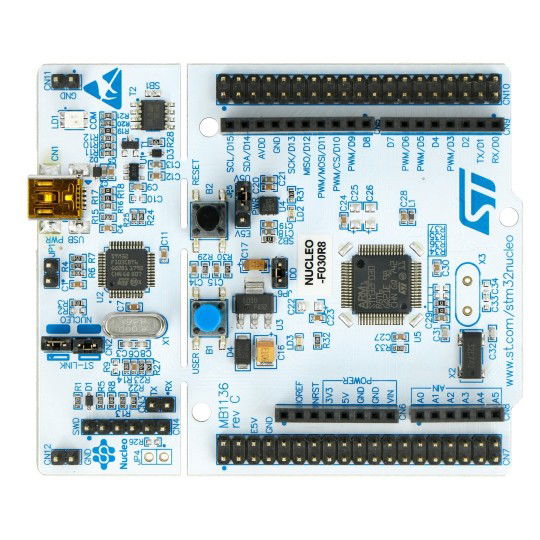
Use F030_bare as the uninstrumented baseline and compare it with F030_inst_rtt or F030_inst_uart for the first instrumentation steps. The three build.sh scripts change to their own project directory and pass their arguments to make; the instrumented variants additionally run trice bind. Put make and the Arm GNU tools on PATH, plus trice and tlog for the instrumented variants. Use ./build.sh -j2 for two compiler jobs. These scripts build firmware without flashing it.
The instrumented variants keep triceConfig.h and the persistent ID-to-format dictionary til.json in version control. Their build scripts run trice bind and make, producing firmware in out/, regenerable headers in out/sidecars and the local li.json location index. Sidecars and li.json are ignored by Git; the latter records current source paths and line numbers. F030_inst is the larger parallel RTT/UART example and retains its existing build workflow.
6.1. F030_bare
Folder: ../examples/F030_bare/
This is a STMCubeMX generated project without Trice instrumentation for easy compare with F030_inst to figure out the needed changes to set up trice.
Build the current project from the repository root with:
cd examples/F030_bare
./build.sh
The firmware files are out/F030_bare.elf, out/F030_bare.hex and out/F030_bare.bin. The original CubeMX setup walkthrough below shows the former build/ output directory; use out/ with the current Makefile and debugger configuration.
6.1.1. Steps performed as potential guide:
- Install STM32CubeMX to
C:\SMT32SubeMX. - Select NUCLEO-F030R8 board.
- Initialize with default values.
- Optionally set system clock to 32MHz for faster target timestamps.
- Optionally set UART baud rate to 115200.
- Set UART word length to 8 bits (including parity), parity to None, and stop bits to 1 (8N1).
- Enable USART2 global interrupt.
- In Project Manager Project:
- Set toolchain folder location to
E:\repos\trice\examples\F030_bare\. - Set project name to
F030_bare. - Set toolchain / IDE to
Makefile.
- Set toolchain folder location to
- In Project Manager Code Generator:
- Select “Copy only the necessary library files”.
- In Project Manager Advanced Settings:
- In Driver Selector change all to LL.
- Generate Code
- Start VS Code and open folder F030_bare with it.
- Start a terminal and type
make. The output should be similar to:
PS E:\repos\trice\examples\F030_bare> make -j
mkdir build
arm-none-eabi-gcc -c -mcpu=cortex-m0 -mthumb   -DUSE_FULL_LL_DRIVER -DHSE_VALUE=8000000 -DHSE_STARTUP_TIMEOUT=100 -DLSE_STARTUP_TIMEOUT=5000 -DLSE_VALUE=32768 -DHSI_VALUE=8000000 -DLSI_VALUE=40000 -DVDD_VALUE=3300 -DPREFETCH_ENABLE=1 -DINSTRUCTION_CACHE_ENABLE=0 -DDATA_CACHE_ENABLE=0 -DSTM32F030x8 -ICore/Inc -IDrivers/STM32F0xx_HAL_Driver/Inc -IDrivers/CMSIS/Device/ST/STM32F0xx/Include -IDrivers/CMSIS/Include -Og -Wall -fdata-sections -ffunction-sections -g -gdwarf-2 -MMD -MP -MF"build/main.d" -Wa,-a,-ad,-alms=build/main.lst Core/Src/main.c -o build/main.o

...

arm-none-eabi-gcc -x assembler-with-cpp -c -mcpu=cortex-m0 -mthumb   -DUSE_FULL_LL_DRIVER -DHSE_VALUE=8000000 -DHSE_STARTUP_TIMEOUT=100 -DLSE_STARTUP_TIMEOUT=5000 -DLSE_VALUE=32768 -DHSI_VALUE=8000000 -DLSI_VALUE=40000 -DVDD_VALUE=3300 -DPREFETCH_ENABLE=1 -DINSTRUCTION_CACHE_ENABLE=0 -DDATA_CACHE_ENABLE=0 -DSTM32F030x8 -ICore/Inc -IDrivers/STM32F0xx_HAL_Driver/Inc -IDrivers/CMSIS/Device/ST/STM32F0xx/Include -IDrivers/CMSIS/Include -Og -Wall -fdata-sections -ffunction-sections -g -gdwarf-2 -MMD -MP -MF"build/startup_stm32F030x8.d" startup_stm32F030x8.s -o build/startup_stm32F030x8.o
arm-none-eabi-gcc build/main.o build/stm32f0xx_it.o build/stm32f0xx_ll_gpio.o build/stm32f0xx_ll_pwr.o build/stm32f0xx_ll_exti.o build/stm32f0xx_ll_usart.o build/stm32f0xx_ll_rcc.o build/stm32f0xx_ll_dma.o build/stm32f0xx_ll_utils.o build/system_stm32f0xx.o build/sysmem.o build/syscalls.o build/startup_stm32F030x8.o  -mcpu=cortex-m0 -mthumb   -specs=nano.specs -TSTM32F030R8Tx_FLASH.ld  -lc -lm -lnosys  -Wl,-Map=build/F030_bare.map,--cref -Wl,--gc-sections -o build/F030_bare.elf
C:/bin/ArmGNUToolchain/bin/../lib/gcc/arm-none-eabi/13.2.1/../../../../arm-none-eabi/bin/ld.exe: warning: build/F030_bare.elf has a LOAD segment with RWX permissions
arm-none-eabi-size build/F030_bare.elf
   text    data     bss     dec     hex filename
   2428      12    1564    4004     fa4 build/F030_bare.elf
arm-none-eabi-objcopy -O ihex build/F030_bare.elf build/F030_bare.hex
arm-none-eabi-objcopy -O binary -S build/F030_bare.elf build/F030_bare.bin
PS E:\repos\trice\examples\F030_bare>
- Install VS Code Cortex-Debug extension.
- Create a launch.json file inside the .vscode subfolder and edit it to get
{
    // Use IntelliSense to learn about possible attributes.
    // Hover to view descriptions of existing attributes.
    // For more information, visit: https://go.microsoft.com/fwlink/?linkid=830387
    "version": "0.2.0",
    "configurations": [
        {
            "name": "Cortex Debug",
            "cwd": "${workspaceFolder}",
            "executable": "./build/F030_bare.elf",
            "request": "launch",
            "type": "cortex-debug",
            "runToEntryPoint": "main",
            "servertype": "jlink",
            "device": "STM32F030R8",
            "svdFile": "./STM32F030R8.svd",
            "runToMain": true

        }
    ]
}
- Download STM32F0x0.svd and save it in the workspace as
STM32F030R8.svdto match thesvdFilesetting above. This SVD covers the STM32F030R8; it is also available with STM32CubeIDE. - You may need to extract and install the STM32 USB drivers. You can find them also in
./third_party/st.com/en.stsw-link009_v2.0.2.zip. - It is assumed, that you converted the OB ST-Link to an OB J-Link already. See Convert Evaluation Board onboard ST-Link to J-Link for details.
- Press the Debug-Button or “CTRL+SHIFT+D” and start debugging.
6.1.2. Hint
- During the code generation, the CubeMX tool did not copy
syscalls.candsysmem.cbut added them to the Makefile. This seems to be a STM32CubeMX “feature”.- You do not need these files for the example project, but you can add them manually to avoid some warnings or extend the code with:
__weak int _close(void) { return -1; }
__weak int _lseek(void) { return -1; }
__weak int _read (void) { return -1; }
__weak int _write(void) { return -1; }
- You do not need these files for the example project, but you can add them manually to avoid some warnings or extend the code with:
6.2. F030_inst_rtt
If you have a STM F030 evaluation board or something similar changing the onboard STLINK to an onboard JLINK is recommended. That allows easy debugging together with direct Trice output.
Folder: ../examples/F030_inst_rtt/
Compare this project with F030_bare to see the changes required for RTT logging. The vendor files are identical. main.c adds the Trice include, initialization and three startup log calls; triceConfig.h selects direct 32-bit RTT output with a stack buffer. The Makefile adds the Trice library and generated headers. No UART logging or RPC support is enabled.
cd examples/F030_inst_rtt
./build.sh
build.sh follows the shared F030 Bind workflow and file-ownership rules.
No project-specific SEGGER_RTT_Conf.h is needed. The include path ends with src/default_conf, which supplies the shared fallback. When RTT is enabled, Trice automatically loads the selected SEGGER configuration and inherits its buffer sizes and channel counts. The example needs neither a SEGGER include nor matching aliases in triceConfig.h. Explicit TRICE_* overrides remain possible, but trice.c rejects values that disagree with the SEGGER configuration. The fallback’s down-buffer and printf-buffer sizes remain 16 and 64.
Flash out/F030_inst_rtt.elf onto a NUCLEO-F030R8 board using your debugger. For example in VC Code with the cortex debug extension press the green triangle after adapting the launch.json to your needs:
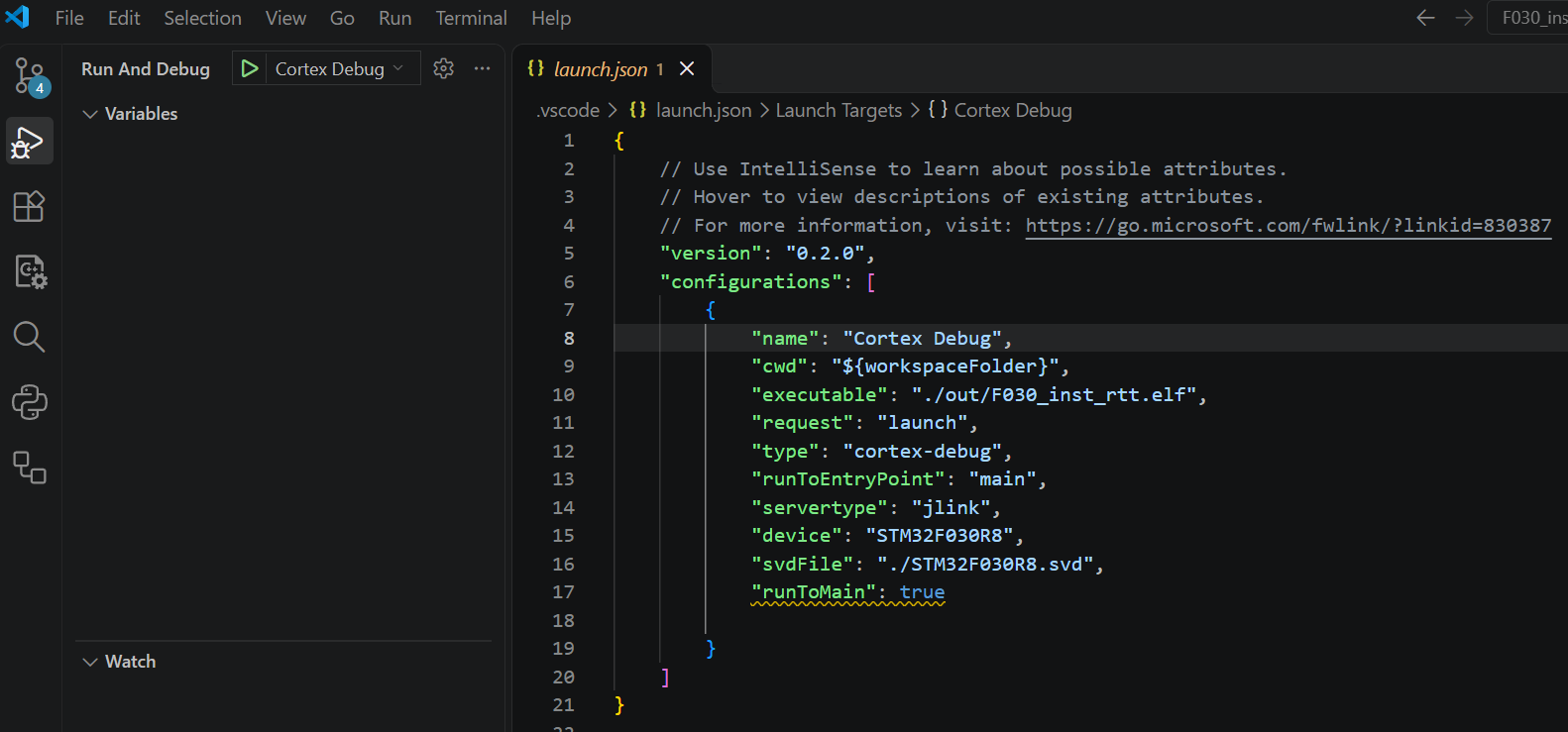
With the SEGGER J-Link tools installed and a J-Link connection to the board, run log.sh, then reset the board:
./log.sh
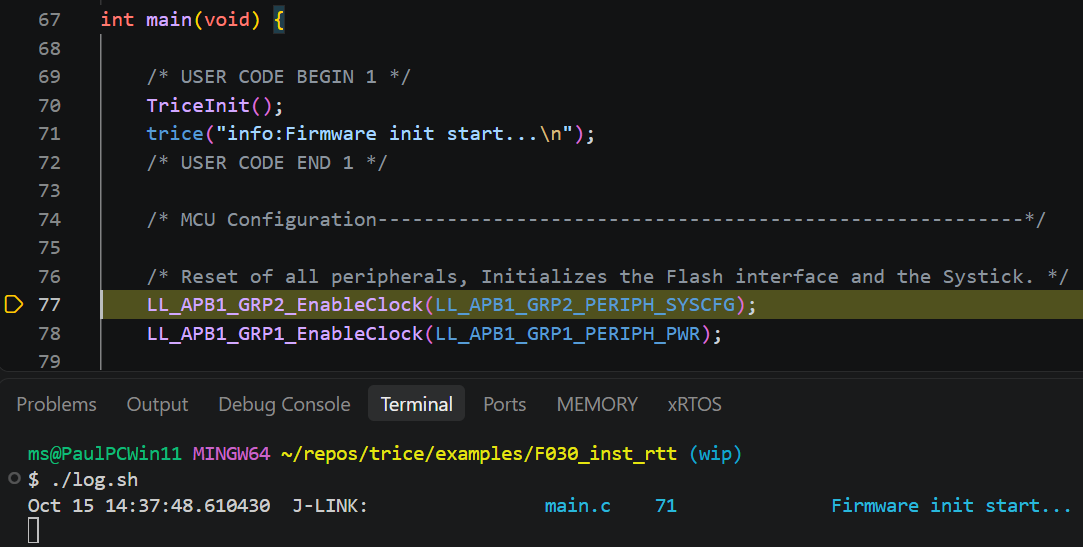
The startup records print Firmware init start..., Firmware init done. and Value=42. TriceInit runs at the beginning of main, allowing logging during peripheral initialization. RTT writes directly to its RAM buffer; no transfer call or UART interrupt is needed. Since this example logs only from main, it does not define its own critical-section macros.
For the corresponding UART steps, compare F030_inst_uart. F030_inst demonstrates RTT and UART in parallel.
6.3. F030_inst_uart
Folder: ../examples/F030_inst_uart/
Compare this project with F030_bare to see the changes required for UART logging. The vendor files are identical. main.c adds the Trice include, initialization and three startup log calls. Its loop calls TriceTransfer to encode and send queued records. USART2 uses 115200 baud, 8N1, matching the bare project’s setting. Its interrupt handler serves the transmit interrupt.
triceConfig.h selects deferred UART output with a ring buffer, while triceUart.h connects the four transmit operations to the STM32 LL API. The Makefile adds the Trice library and generated headers. No RTT logging, receive backchannel or RPC support is enabled, and no project-specific SEGGER_RTT_Conf.h is needed.
The critical-section macros remain necessary even though application log calls run only in main: the UART driver shares its transmit pointer, index and remaining-byte count between TriceTransfer and the USART interrupt. Saving PRIMASK, disabling interrupts and restoring the previous mask protects this state, including nested critical sections.
cd examples/F030_inst_uart
./build.sh
build.sh follows the shared F030 Bind workflow and file-ownership rules.
Flash out/F030_inst_uart.elf onto a NUCLEO-F030R8 board using your debugger. USART2 TX is PA2, connected to the board’s ST-LINK virtual COM port. Run log.sh, then reset the board. The default port is COM7; select another port with the normal tlog switch -p:
./log.sh
# For example, on Linux:
./log.sh -p /dev/ttyACM0
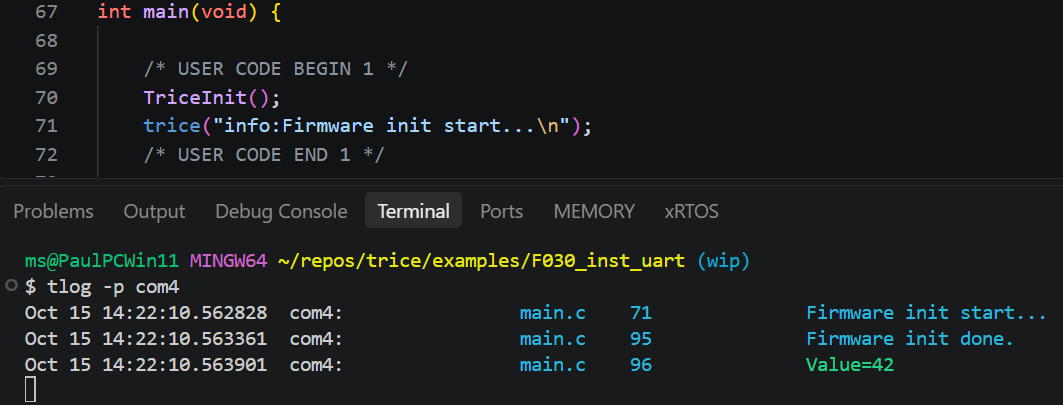
The startup records print Firmware init start..., Firmware init done. and Value=42. TriceInit runs at the beginning of main; records generated before USART initialization stay in RAM until the loop calls TriceTransfer. The UART then sends asynchronously through TX-empty interrupts.
For the corresponding RTT steps, compare F030_inst_rtt. F030_inst demonstrates RTT and UART in parallel.
6.4. F030_inst
Folder: ../examples/F030_inst/
This example enables deferred UART output and parallel direct RTT output in triceConfig.h. It uses the shared example producers. Its remaining obsolete RPC configuration is not part of the recommended integration. Encryption is disabled by default. For setup see Trice over RTT and adapt steps from F030_bare.
The project-specific SEGGER_RTT_Conf.h sets the RTT down-buffer and printf-buffer sizes to 0. Trice automatically inherits these values from the selected SEGGER configuration. Removing the project file would select the shared fallback with sizes 16 and 64 instead; either configuration passes the consistency checks unless an explicit TRICE_* override disagrees with it.
6.4.1. Intrumenting:
- Extend the Makefile with the information you get from comparing the Makefile here and in ../F030_bare/.
- Add build.sh and clean.sh.
- For a new RTT project, copy and adapt the small fallback
SEGGER_RTT_Conf.hinto ./Core/Inc/, or use the fallback include directory unchanged. Existing examples keep their full project configuration; see Trice over RTT. - Copy and adapt a file triceConfig.h to ./Core/Inc/. You can choose from another example project or one of the test folders.
- Create 2 empty files:
touch til.json li.jsoninside ./ - Run
build.sh. This should build all. - Add
#include "trice.h"to main.c and to stm32f0xx_it.c and edit these files according to diff. -
Add to
int main( void )someTrice( "..." );messages. - Run
trice sto determine the relevant comport. - You can have this output parallel:
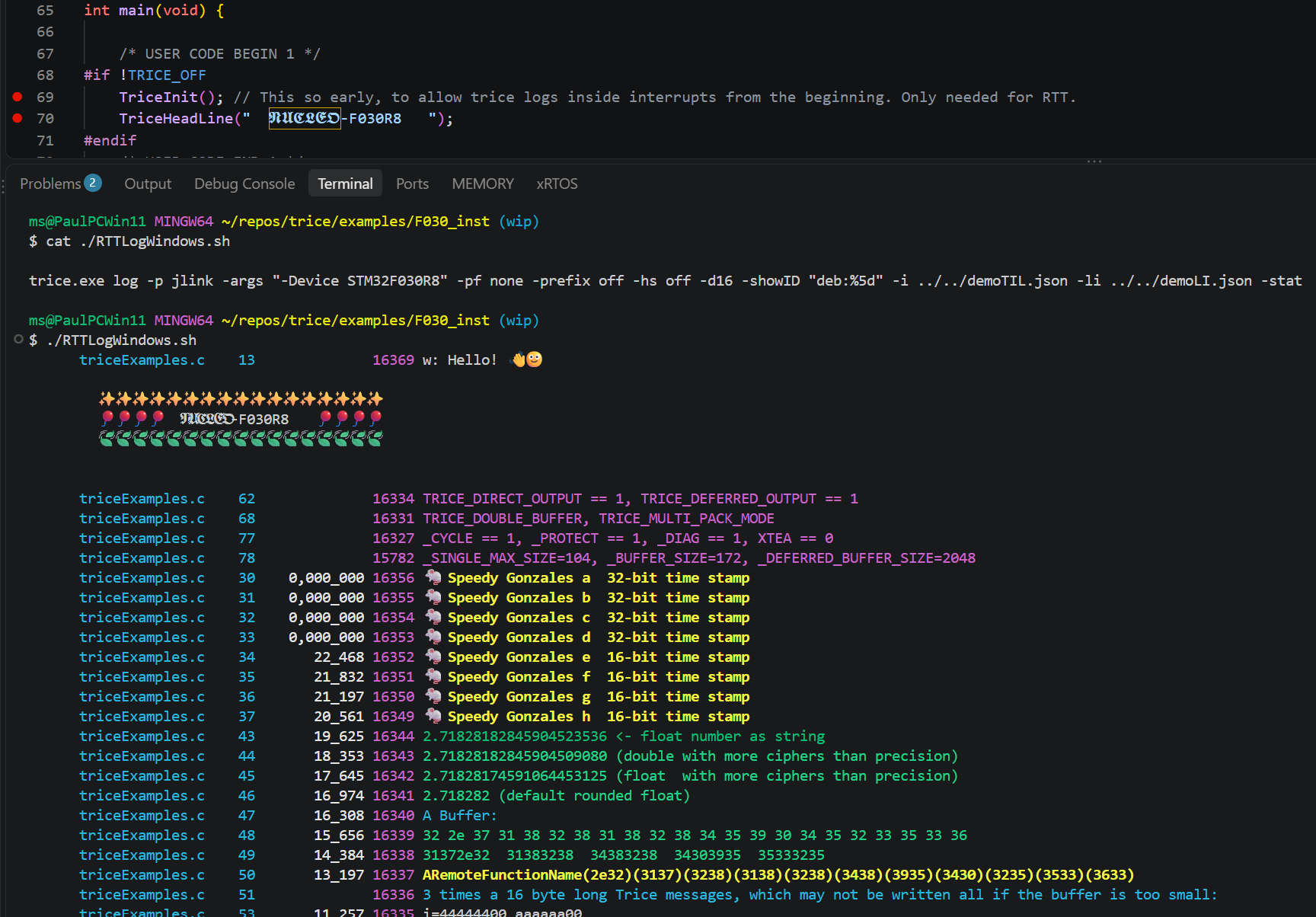
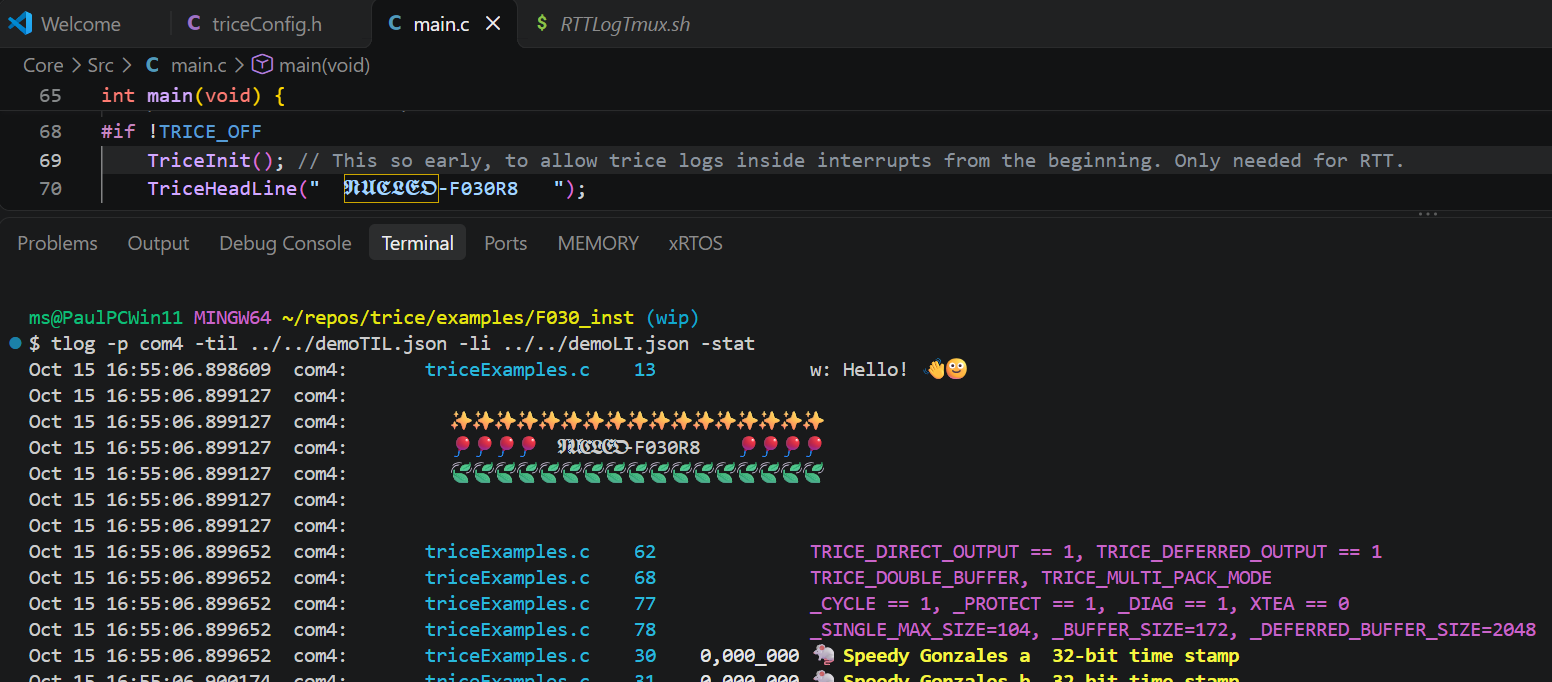
- The Trices with 16-bit timestamps are about 150 clocks away from each other. @32MHz this is a time of less 5 µs.
7. Nucleo-G0B1 Examples
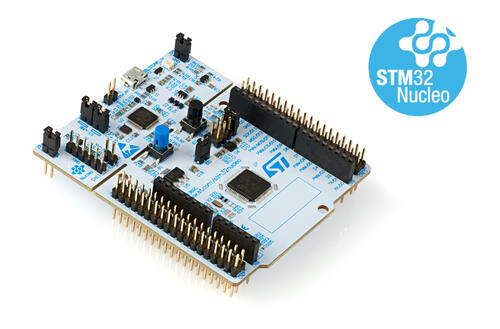
7.1. G0B1_bare
Folder: ../examples/G0B1_bare/
7.1.1. G0B1_bare Description
- This is a working example with CLang and also GCC.
- This is a STMCubeMX generated project. It was then manually adapted to Clang.
- It is without TRICE instrumentation for easy compare with ../G0B1_inst to figure out the needed changes to set up trice.
7.1.2. Setting Up G0B1_bare
- See and adapt steps from F030_bare.
- Then add/modify the files to reach this folder layot.
7.2. G0B1_inst
Folder: ../examples/G0B1_inst/
The default configuration logs directly over RTT without framing and sends encrypted COBS-framed records over UART.
7.2.1. Setting Up
- See and adapt steps from G0B1_bare.
7.2.2. Instrumenting
- The steps are similar to the steps in F030_bare.
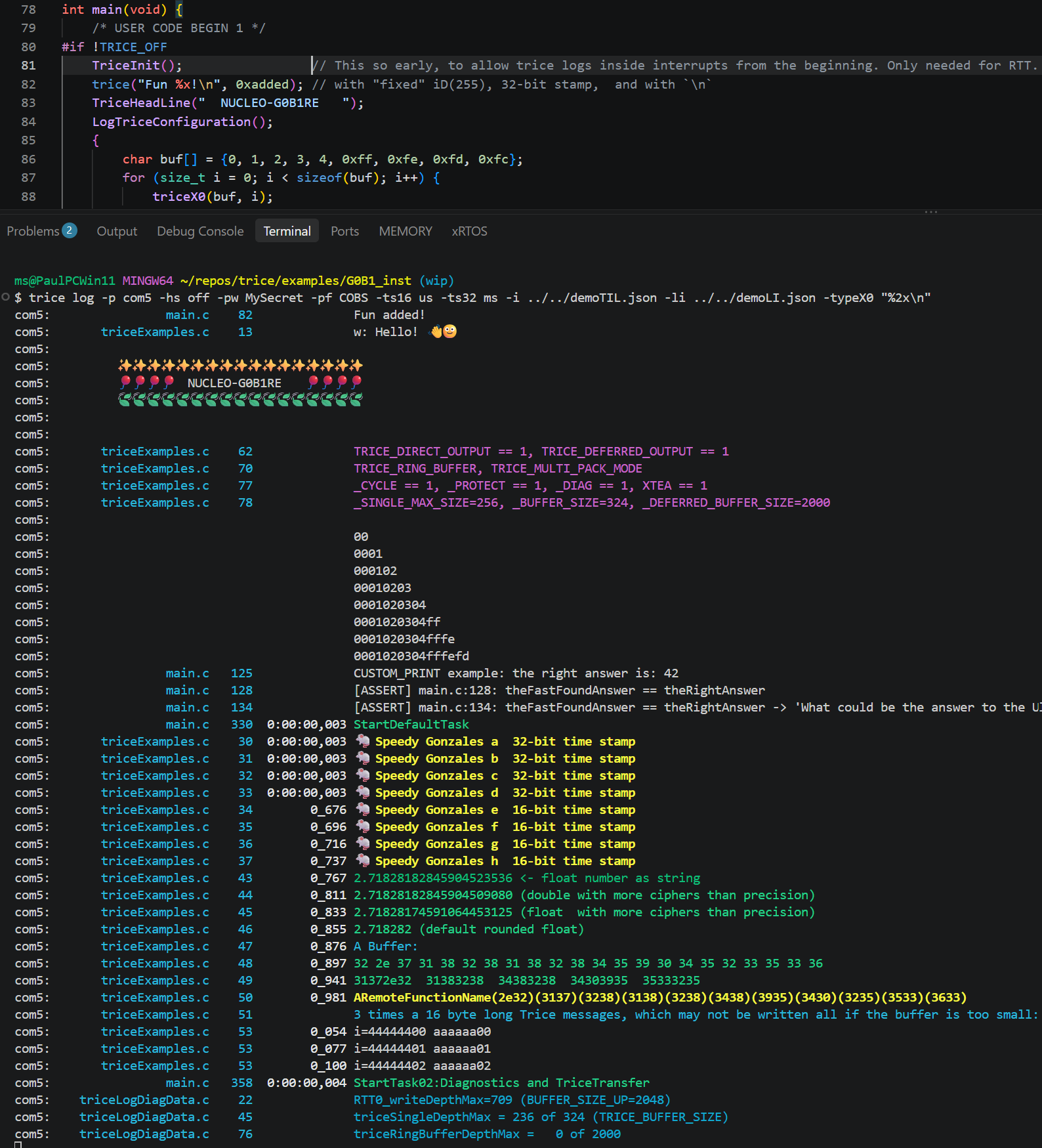
- See comments in triceConfig.h and commandlines in screenshot.
7.2.3. G0B1 clock benchmark
Use G0B1_inst to compare GCC and Clang on the same board. Configuration 0 remains
the default; configuration 98 selects the bounded logging benchmark. No CubeMX
installation, external crystal, measurement pin or additional library is required.
| Setting | Configuration 0 | Configuration 98 |
|---|---|---|
| CPU clock | Original 16 MHz | 64 MHz from HSI16 and PLL |
| Compiler optimization | -O3 |
-O3 |
| Logging | Original examples and TriceCheck |
Eight bursts of 16 parameterless records without timestamps |
| Buffer and output | Ring buffer, direct RTT plus deferred encrypted UART | 4096-byte double buffer, deferred UART, COBS, no encryption |
| Protection, diagnostics, message counter | Original defaults | Disabled for this bounded, single-writer measurement |
| Other log writers | Original tasks and timer interrupt | Quiet; the default task owns logging and transfer |
| Timestamp units | TIM17 microseconds; HAL milliseconds | Raw TIM2 clocks, if timestamped calls are added |
Open a terminal in examples/G0B1_inst. Use Bash (Git Bash on Windows), GNU make,
Trice and the Arm GNU bare-metal toolchain; Clang builds also need Clang with ARM
support and its matching llvm-size utility. Put those tools on PATH. Choose one
of these compiler commands:
# GCC
bash ./build.sh 98

# Clang
bash ./build_with_clang.sh 98
CONFIGURATION=98 is accepted as an alternative to 98. Use 0 or omit the
configuration to restore the original example. Other numbers are rejected. Existing
defines such as TRICE_OFF=1 and the --x0-matrix check remain available with both compilers.
TRICE_OFF=1 disables the measurement as well. Build scripts rebuild when changing
configuration; direct Make users must clean before changing TRICE_FLAGS.
The firmware images remain in out.gcc or out.clang; building does not flash the board.
Build and flash one compiler’s image, open the decoder, then reset the board to
capture its measurement. Repeat for the other compiler; existing build cleanup
steps can remove both output directories. Decode with the tables generated by
the matching build. Replace COM4 with your serial port, such as /dev/ttyACM0
on Linux or the board’s /dev/cu.* device on macOS:
trice log -p COM4 -pf COBS -prefix off -hs off -i ../../demoTIL.json -li ../../demoLI.json
Configuration 98 sends no direct RTT output and needs no encryption password. Leave the decoder open before resetting to capture the one-time measurement. The stream contains 128 benchmark records, a compiler/clock description and eight result records. The original configuration 0 decoder commands still apply to 0.
TIM2 counts at 64 MHz without a prescaler or interrupt: one tick is one CPU clock, nominally 15.625 ns. HAL keeps TIM17 and FreeRTOS keeps SysTick. The timer setup and the 64 MHz voltage/Flash/PLL setup are ordinary C code already included in the project. See ST’s timer and clock specifications.
Each sample reports raw, overhead, net and clocks/log. Interrupts are masked
only around each measured block, then their previous state is restored. Compiler
barriers bound record writes; DSB includes completion of hardware stores. The empty
block measures the counter-read/barrier overhead. net is raw - overhead, clamped
to zero if measurement noise makes the empty block longer. clocks/log divides
that correction by 16, showing two decimal places without floating-point arithmetic.
UART encoding and transfer start after all measurements and reports are buffered.
Let the measured blocks run without single-stepping or breakpoints.
This is best-case throughput for consecutive logs: the compiler may combine stores
and buffer-pointer updates across calls. It does not establish the cost of every
isolated call, timestamp, parameter list or transport. Inspect the generated code
and repeat board measurements when comparing compilers. Build and host tests do
not establish measured hardware timings. G0B1_features retains its feature tour.
8. Nucleo-L432KC Examples

8.1. L432_bare
Folder: ../examples/L432_bare/
- This example is without Trice istrumentation and serves for comparing with L432_inst to see the needed instrumentation steps quickly.
- This is a STMCubeMX generated project.
- See and adapt steps from F030_bare example.
- It was then manually adapted additionally to Clang.
- It was additionally configured for FreeRTOS.
8.2. L432_inst
Folder: ../examples/L432_inst/
- This is the with Trice instrumented example project L432_bare.
- It is for easy compare to figure out the needed setup changes.
- See and adapt steps in F030_bare.
- Then add/modify the files to reach this folder layout.
8.2.1. Build:
The GCC and Clang entry points in G0B1_inst, L432_inst and G0B1_features
accept the same argument forms and control options:
| Arguments | Effect |
|---|---|
| None | Keep the project default. G0B1_features runs its private feature tour. |
98 or CONFIGURATION=98 |
Select a supported configuration for this build. |
NAME or NAME=VALUE |
Pass an extra compiler define; may follow the configuration. |
-h or --help |
Show usage without preparing sources or building. |
--check |
Check the selected compiler’s prerequisites without preparing sources or building. |
--x0-matrix |
Build the four logging/typeX0 combinations with the selected compiler. |
Use control options alone. Select at most one configuration: G0B1_inst supports
0 and 98; L432_inst supports 0 through 100. G0B1_features has no selectable
configuration profiles. Its standalone builds retain the private feature-tour
preparation, including when extra defines are passed.
For L432, run ./build.sh for configuration 0, ./build.sh 34 or
./build.sh CONFIGURATION=34 for example. Extra defines work with either compiler,
such as bash ./build_with_clang.sh 98 TRICE_OFF=1.
For Clang, open a terminal in examples/L432_inst and run:
bash ./build_with_clang.sh 98
bash ./build_with_clang.sh --help
Choose a number from 0 through 100. CONFIGURATION=98 is also accepted. The
number selects this build only; the default in Core/Inc/triceConfig.h stays unchanged.
Configuration 98 uses deferred double buffering without protection, diagnostics,
the message cycle counter or encryption. It is suitable for measuring minimum log
call overhead when the buffer has enough space and writers do not overlap.
Clang compiles with -O3; Arm GNU tools link and create the images. See
L432 Clang prerequisites for setup and troubleshooting.
Each run prepares the Trice Bind headers and rebuilds the Clang objects, including
after a configuration change. An outer repository test can own Bind/Insert preparation.
GCC outputs are preserved. The firmware images are out.clang/L432KC.elf, .hex
and .bin; the script does not flash the board. Linker diagnostics appear in the
terminal and remain in gccLinksClangWarning.txt.
To change parallelism, use MAKE_JOBS=-j4 bash ./build_with_clang.sh 98.
The example includes four parameterless messages without timestamps, in addition to the 16-bit and 32-bit timestamp examples. DWT timestamps count MCU clocks at 64 MHz. The older timings below are recorded measurements; use disassembly and new board measurements to determine the clock count of the current build.
L432 Clang prerequisites
Run bash ./build_with_clang.sh --check from examples/L432_inst before the first
build. It checks installed tools, the Cortex-M4 hard-float runtime and GCC header
search paths. It preprocesses empty input to inspect the compiler’s configuration;
it creates no source, Bind, object or firmware files. No tools are installed automatically.
A successful check establishes prerequisites; a native firmware build and board
measurement are separate validation steps.
Use tools built for your host OS and CPU architecture. Put their executable
directories on PATH so all commands below are available in the same terminal.
| Host | Shell and tools |
|---|---|
| Windows | Git Bash and native Windows compiler/toolchain executables. Git Bash supplies cygpath for native path conversion. |
| Linux, including WSL | Bash and Linux compiler/toolchain executables. |
| macOS | System Bash 3.2 or newer, and macOS compiler/toolchain executables. Clang must include the Thumb backend. |
| Required component | Purpose and check |
|---|---|
| Bash 3.2 or newer | Runs the script; common POSIX utilities such as awk, tr and uname must also be available. |
| GNU make | Runs the Makefile. make --version must identify GNU Make. |
| Clang | Compiles for Cortex-M4. clang --print-targets must list thumb; a compiler built only for the host is insufficient. |
| Arm GNU bare-metal toolchain | Supplies arm-none-eabi-gcc, arm-none-eabi-objcopy and arm-none-eabi-size. GCC must report arm-none-eabi as its target. |
| Matching Newlib headers and runtime | Supplies stdlib.h, libc.a, libc_nano.a, libm.a, libnosys.a and nano.specs; GCC also supplies libgcc.a. The runtime must include Cortex-M4 hard-float variants. |
| Trice from this checkout | Generates current Bind headers. A managed repository test may already own Bind/Insert preparation. |
Distribution packages sometimes split the compiler, binutils, Newlib headers and
nano runtime into separate packages. Install the matching components from the
same toolchain release. Separate LLVM objcopy and size programs are unnecessary.
Header discovery uses GCC’s actual include search list.
It supports headers installed separately from libraries, versioned GCC directories,
multilib subdirectories, relocated toolchains and paths containing spaces. It makes
no assumption that include is next to the selected libc.a.
| Reported problem | Action |
|---|---|
Required tool missing from PATH, or tool cannot run |
Install the component for your host OS/CPU, reopen the terminal and check its executable directory on PATH. |
make is not GNU Make |
Select GNU make on PATH. |
| Clang has no Thumb backend | Select a Clang installation that includes ARM/Thumb support. |
| GCC reports an incompatible target | Select the Arm GNU bare-metal compiler named arm-none-eabi-gcc. |
| ARM runtime file unavailable | Install the matching Newlib/nano and GCC runtime packages with Cortex-M4 hard-float support. The message names the missing file and GCC’s reported path. |
stdlib.h not found in GCC search paths |
Install the matching ARM Newlib headers and check the listed directories. Host C library headers cannot replace ARM headers. |
| Header search query fails | Read the GCC diagnostics above the message; check that the complete compiler installation is executable and supports the selected Cortex-M4/FPU options. |
Invalid CLANG_LIBC_INCLUDE |
Correct or unset the override. It must name the ARM header directory containing stdlib.h. Relative paths start at examples/L432_inst. |
| Bind or firmware build fails | Read the original diagnostics above the final message. Linker diagnostics also remain in gccLinksClangWarning.txt. |
For a custom header installation outside GCC’s search paths, set
CLANG_LIBC_INCLUDE to its ARM Newlib header directory, then run --check again.
This override selects headers only; GCC must still locate the matching runtime.
Clang receives the shared options with GCC-only switches removed. The optional
-Wwrite-strings and -Wmissing-noreturn checks, plus the GNU-stack warning from
the Arm GNU runtime (such as crtn.o), are currently disabled for L432 while working
on logging performance. Other compiler and linker diagnostics remain visible.
To keep diagnostics from parallel compiler jobs separate while
troubleshooting, run MAKE_JOBS=-j1 bash ./build_with_clang.sh 98.
Deferred Mode for max Speed
The stamps are MCU clocks here, so 🐁 Speedy Gonzales lasts 9 processor clocks here.
ms@DESKTOP-7POEGPB MINGW64 ~/repos/trice_wt_devel/examples/L432_inst (devel)
$ trice l -p com8 -hs off -prefix off
      triceExamples.c    10        0_272  Hello! 👋🙂

        ✨✨✨✨✨✨✨✨✨✨✨✨✨✨✨✨✨
        🎈🎈🎈🎈  𝕹𝖀𝕮𝕷𝕰𝕺-L432KC   🎈🎈🎈🎈
        🍃🍃🍃🍃🍃🍃🍃🍃🍃🍃🍃🍃🍃🍃🍃🍃🍃


        triceConfig.h   369              CONFIGURATION == 34 - UART, no cycle counter, no critical sections.
      triceExamples.c    45              TRICE_DIRECT_OUTPUT == 0, TRICE_DEFERRED_OUTPUT == 1
      triceExamples.c    51              TRICE_DOUBLE_BUFFER, TRICE_MULTI_PACK_MODE
      triceExamples.c    60              _CYCLE == 0, _PROTECT == 0, _DIAG == 0, XTEA == 0
      triceExamples.c    61              _SINGLE_MAX_SIZE=512, _BUFFER_SIZE=580, _DEFERRED_BUFFER_SIZE=4096
      triceExamples.c    15    0,000_731 🐁 Speedy Gonzales
      triceExamples.c    16    0,000_745 🐁 Speedy Gonzales
      triceExamples.c    17    0,000_754 🐁 Speedy Gonzales
      triceExamples.c    18    0,000_763 🐁 Speedy Gonzales
      triceExamples.c    19    0,000_772 🐁 Speedy Gonzales
      triceExamples.c    20    0,000_781 🐁 Speedy Gonzales
      triceExamples.c    21    0,000_790 🐁 Speedy Gonzales
      triceExamples.c    22    0,000_799 🐁 Speedy Gonzales
      triceExamples.c    24        0_981 2.71828182845904523536 <- float number as string
      triceExamples.c    25        1_230 2.71828182845904509080 (double with more ciphers than precision)
      triceExamples.c    26        1_268 2.71828174591064453125 (float  with more ciphers than precision)
      triceExamples.c    27        1_296 2.718282 (default rounded float)
      triceExamples.c    28        1_310 A Buffer:
      triceExamples.c    29        1_348 32 2e 37 31 38 32 38 31 38 32 38 34 35 39 30 34 35 32 33 35 33 36
      triceExamples.c    30        1_603 31372e32  31383238  34383238  34303935  35333235
      ...
      triceExamples.c    32              10 times a 16 byte long Trice messages, which not all will be written because of the TRICE_PROTECT:
      triceExamples.c    34        2_072 i=44444400 aaaaaa00
      triceExamples.c    34        2_119 i=44444401 aaaaaa01
      triceExamples.c    34        2_166 i=44444402 aaaaaa02
8.2.2. “Hardware” Changes
- The used evaluation board is delivered with an on-board ST-Link software for debugging.
- This was changed to an on-board J-Link software for better debugging and RTT support.
- See Trice over RTT about that.
8.2.3. Using RTT with on-board J-Link and JLinkRTTLogger
- You need to install the “J-Link Software and Documentation pack” for yout OS.
- ./Core/Inc/triceConfig.h contains example Trice log commands.
8.2.4. Using RTT with on-board J-Link and OpenOCD
With Windows not possible
- OpenOCD does not support the installed JLink driver.
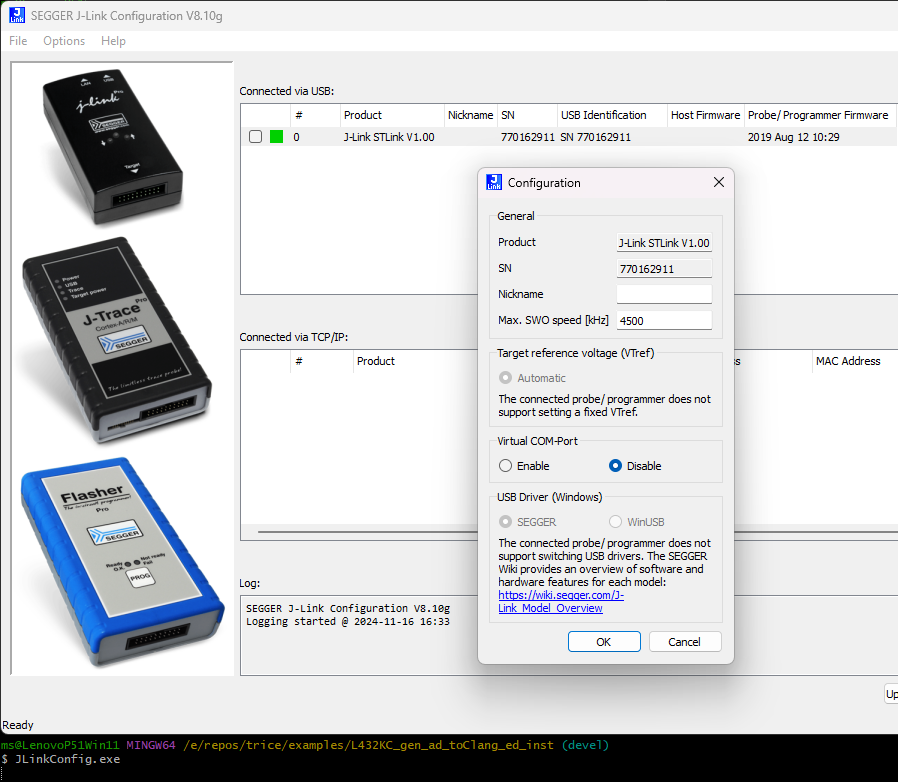
- Changing to the WinUSB buld device driver is here not supported :-(
Darwin (macOS)
- See OpenOCD with Darwin in Trice over RTT
8.2.5. Using RTT with on-board ST-Link and OpenOCD
Terminal 1:
ms@LenovoP51Win11 MINGW64 /e/repos/trice/examples/L432_inst (devel)
$ openocd -f STLinkOpenOCD.cfg
Open On-Chip Debugger 0.12.0 (2024-09-16) [https://github.com/sysprogs/openocd]
Licensed under GNU GPL v2
libusb1 d52e355daa09f17ce64819122cb067b8a2ee0d4b
For bug reports, read
        http://openocd.org/doc/doxygen/bugs.html
Info : The selected transport took over low-level target control. The results might differ compared to plain JTAG/SWD
Info : clock speed 100 kHz
Info : STLINK V2J24M11 (API v2) VID:PID 0483:374B
Info : Target voltage: 72.811768
Info : [stm32l4x.cpu] Cortex-M4 r0p1 processor detected
Info : [stm32l4x.cpu] target has 6 breakpoints, 4 watchpoints
Info : [stm32l4x.cpu] Examination succeed
Info : [stm32l4x.cpu] starting gdb server on 3333
Info : Listening on port 3333 for gdb connections
Info : rtt: Searching for control block 'SEGGER RTT'
Info : rtt: Control block found at 0x2000145c
Info : Listening on port 9090 for rtt connections
Channels: up=1, down=3
Up-channels:
0: Terminal 1024 0
Down-channels:
0: Terminal 16 0
Info : Listening on port 6666 for tcl connections
Info : Listening on port 4444 for telnet connections
Terminal2:
ms@LenovoP51Win11 MINGW64 /e/repos/trice/examples/L432_inst (devel)
$ trice l -p TCP4 -args localhost:9090  -pf none -d16
Nov 16 20:38:12.376056  TCP4:       triceExamples.c    10        1_595  Hello! 👋🙂
Nov 16 20:38:12.376056  TCP4:
Nov 16 20:38:12.376056  TCP4:         ✨✨✨✨✨✨✨✨✨✨✨✨✨✨✨✨✨
Nov 16 20:38:12.376056  TCP4:         🎈🎈🎈🎈  𝕹𝖀𝕮𝕷𝕰𝕺-L432KC   🎈🎈🎈🎈
Nov 16 20:38:12.376056  TCP4:         🍃🍃🍃🍃🍃🍃🍃🍃🍃🍃🍃🍃🍃🍃🍃🍃🍃
Nov 16 20:38:12.376056  TCP4:
Nov 16 20:38:12.376056  TCP4:
Nov 16 20:38:13.891033  TCP4:       triceExamples.c    16       43_439 2.71828182845904523536 <- float number as string
Nov 16 20:38:14.874024  TCP4:       triceExamples.c    17       44_949 2.71828182845904509080 (double with more ciphers than precision)
Nov 16 20:38:15.692614  TCP4:       triceExamples.c    18       45_802 2.71828174591064453125 (float  with more ciphers than precision)
Nov 16 20:38:16.323665  TCP4:       triceExamples.c    19       46_536 2.718282 (default rounded float)
8.2.6. Using On-board ST-Link and VS-Code Cortex-Debug Extension
Fail
- https://www.st.com/resource/en/user_manual/um2576-stm32cubeide-stlink-gdb-server-stmicroelectronics.pdf
- Downloaded and installed
en.stm32cubeprg-win64-v2-17-0.zipen.st-link-server-v2-1-1.zip- PATH variable extended with
C:\Program Files (x86)\STMicroelectronics\stlink_server - Copied
- From: “C:\Program Files (x86)\STMicroelectronics\stlink_server\stlinkserver.exe”
- To: “C:\Program Files (x86)\STMicroelectronics\stlink_server\ST-LINK_gdbserver.exe”
- PATH variable extended with
OK
- Download st-util from github.com
- Unpack to
C:\bin\stlink-1.8.0-win32and addC:\bin\stlink-1.8.0-win32\binto path - Copy
C:\bin\stlink-1.8.0-win32\Program Files (x86)\stlinktoC:\Program Files (x86)\stlink - Get
C:\bin\libusb-1.0.27 - Copy
C:\bin\libusb-1.0.27\MinGW64\dll\libusb-1.0.dlltoC:\bin\stlink-1.8.0-win32\bin\libusb-1.0.dllms@LenovoP51Win11 MINGW64 /e/repos/trice/examples/L432_inst (devel) $ st-util.exe st-util 1.8.0 libusb: info [get_guid] no DeviceInterfaceGUID registered for 'USB\VID_056A&PID_5105\5&1140C04&0&10' libusb: info [get_guid] no DeviceInterfaceGUID registered for 'USB\VID_056A&PID_5105&MI_01\6&13339912&0&0001' libusb: info [get_guid] no DeviceInterfaceGUID registered for 'USB\VID_058F&PID_9540\5&1140C04&0&11' libusb: info [get_guid] no DeviceInterfaceGUID registered for 'USB\VID_8087&PID_0A2B\5&1140C04&0&14' libusb: info [get_guid] no DeviceInterfaceGUID registered for 'USB\ROOT_HUB30\4&20F1DF2E&0&0' libusb: info [get_guid] no DeviceInterfaceGUID registered for 'USB\VID_0765&PID_5010\5&1140C04&0&13' libusb: info [get_guid] no DeviceInterfaceGUID registered for 'USB\VID_0483&PID_374B&MI_01\6&224DEA1D&0&0001' libusb: info [get_guid] no DeviceInterfaceGUID registered for 'USB\VID_5986&PID_111C&MI_00\6&104790C2&0&0000' libusb: info [get_guid] no DeviceInterfaceGUID registered for 'USB\VID_046D&PID_C534\5&1140C04&0&6' libusb: info [get_guid] no DeviceInterfaceGUID registered for 'USB\VID_0483&PID_374B&MI_02\6&224DEA1D&0&0002' libusb: info [get_guid] no DeviceInterfaceGUID registered for 'USB\VID_0483&PID_374B\066CFF515570514867145144' libusb: info [get_guid] no DeviceInterfaceGUID registered for 'USB\VID_138A&PID_0097\72FA8C531499' libusb: info [get_guid] no DeviceInterfaceGUID registered for 'USB\VID_056A&PID_5105&MI_00\6&13339912&0&0000' libusb: info [get_guid] no DeviceInterfaceGUID registered for 'USB\VID_046D&PID_C534&MI_01\6&C944391&0&0001' libusb: info [get_guid] no DeviceInterfaceGUID registered for 'USB\VID_046D&PID_C534&MI_00\6&C944391&0&0000' libusb: info [get_guid] no DeviceInterfaceGUID registered for 'USB\VID_5986&PID_111C\200901010001' 2024-11-17T22:20:05 INFO common.c: STM32L41x_L42x: 48 KiB SRAM, 256 KiB flash in at least 2 KiB pages. 2024-11-17T22:20:05 INFO gdb-server.c: Listening at *:4242... Receive signal 0. Exiting...(Last line after
CTRL-C)