Trice - Trace IDs for Embedded C/C++
The name combines TRace IDs, C/C++, and Embedded systems.





Hi, I am Trice.
Trice is a compact ID-based logging framework for embedded C/C++.
Firmware code uses printf-like calls, but the target sends only small binary records: an ID plus optional runtime values.
The PC-side trice tool reconstructs the readable text using the project-specific til.json which is intentionally cumulative: old IDs and format strings remain available. Decoding older firmware also requires a host tool that supports those format strings; see firmware and host-tool compatibility.
Use Trice when normal printf logging is too slow, too large, too intrusive in interrupt contexts, or too inefficient for field diagnostics.
Reference Manual: GitHub - GitHub Pages - PDF - Project page
Log in a trice — even from ↯ interrupt handlers in a few CPU cycles in optimized configurations❗
Small demo animation

Quickstart
Choose one first path:
| Situation | Start here |
|---|---|
| You already have a non-blocking byte writer, DMA TX queue, USB CDC writer, socket writer, pipe, or file writer | Existing non-blocking byte writer |
| You have a SEGGER J-Link and want the quickest lab setup | SEGGER RTT direct mode |
| You want UART or USB-VCOM output | UART / USB-VCOM deferred output |
| You want complete STM32 examples | Example projects |
For most existing projects, the non-blocking byte writer path is the least disruptive first integration.
Recommended ID workflow: trice bind
trice bind is the successor to the legacy trice insert / trice clean workflow. It keeps numeric IDs out of bind-managed Trice calls by generating sidecar headers as temporary build artefacts. Existing insert / clean projects remain fully supported and continue to work unchanged. This technique does not patch the user sources anymore during the build process. See Trice Bind in Reference Manual for details.
trice bind is currently experimental and is not yet included in an official release. To try it before the next release, build the trice tool from this repository and ensure the resulting executable is in your PATH:
./scripts/buildTriceTool.sh
Try the minimal demo. It uses only the installed trice binary and the target sources in src from this repository.
Details and advanced topics
Basics
Minimal source example
Trice gives embedded firmware a fast logging path with a familiar source-code style:
trice("boot\n");
trice("adc=%d mV\n", adc_mV);
Instead of formatting strings on the target, Trice stores the human-readable text on the host and transfers compact binary records from the target. This reduces target FLASH usage, transfer bandwidth, log files and log-call execution time.
How ID-based decoding works
The recommended workflow uses trice bind as described above. The following steps describe the legacy source-modifying workflow, which remains supported:
- Write
trice(...)calls in firmware code. - Run
trice insertbefore compilation. - The compiler sees stable numeric IDs.
- The target emits compact binary Trice records.
- The PC tool decodes them with the accumulated
til.json.
A typical source-level idea is:
- printf("Temperature: %d °C\n", t);
+ trice("Temperature: %d °C\n", t);
Legacy source-code ID workflow (still supported)
The legacy workflow assigns IDs by processing source files with trice insert. This workflow remains supported for existing and new projects.
A call such as this:
trice("boot\n");
becomes similar to this before compilation:
trice(iD(12345), "boot\n");
This is intentional: the target binary contains the ID, while the host keeps the text in til.json.
You can choose how visible those IDs are in your workflow:
- keep inserted IDs in source,
- run
trice cleanafter the build, - use the Trice cache to avoid needless rebuilds of unchanged files.
For team projects, define this policy early and treat til.json like any other build artifact needed for field diagnostics.
See Trice ID management.
Key benefits
- Easy Migration – reuse existing
printf-style code with minimal changes via the-aliasoption - Long-term field decoding – decode logs from released firmware when the matching or accumulated
til.jsonis preserved. - Reduced target FLASH - format strings are kept in
til.json, not in the target image. - Very low target overhead - down to a few CPU cycles in optimized configurations; see Trice Speed.
- Transport friendly - UART, RTT, TCP/UDP, files, or your own non-blocking byte writer.
- Compact transfer – a Trice record contains one 32-bit ID plus optional runtime values, reducing bandwidth and log-file size.
- Portable tooling - the host tool is written in Go and runs on common desktop platforms.
- Further features - like encryption, timestamps, flexible logging, transport options and tooling are described here.
- Fully documented: Trice Reference Manual
Which mode should you start with?
| Mode / path | Use when |
|---|---|
| Deferred auxiliary 8-bit | You already have a non-blocking byte writer. This is usually the most universal first integration. |
| Direct SEGGER RTT | You have J-Link/RTT and want a fast interactive lab setup. |
| Deferred UART / USB-VCOM | Your board exposes a serial path and you want a conventional PC input stream. |
| Deferred ring buffer | You want a balanced default for RAM usage and runtime behavior. |
| Deferred double buffer | You want the shortest target-side log-call path and can spend more RAM. |
Direct mode writes each record immediately to the selected backend.
Deferred mode writes first into a target buffer; TriceTransfer() sends later.
Integration workflow
Two parts of Trice
Trice has two cooperating parts:
- Target-side C/C++ macros provide a familiar
printf-like interface but emit IDs and values instead of full format strings. - The PC-side
tricetool manages IDs, receives binary data, and reconstructs readable log output.
The host tool is written in Go and runs on common desktop platforms. You can also build your own receiver that reads Trice packages, maps IDs to format strings, and displays or stores the decoded output.
Files: til.json, li.json, and binary logs
| File | Purpose | Keep? |
|---|---|---|
til.json |
Maps IDs to format strings | Yes; required for decoding |
li.json |
Maps IDs to source locations | Useful for diagnostics |
| Binary log file | Raw target output | Useful for offline or field decoding |
Keep the one accumulated til.json to decode all previously released firmware versions.
The repository example file is demoTIL.json.
Each li.json entry stores a normalized File path relative to the location-file
directory by default. Use -liRoot to select a different project root when
creating location data. Log output shows only the file name by default; use
-liMaxDirs to include trailing parent directories.
Legacy insert/clean ID workflows (still supported)
These three source-modifying workflows remain fully supported:
Keep IDs in source - good for small projects and maximum robustness.
trice insert -src ./ -i ./til.json -li ./li.json
# build normally
Insert before build, clean after build - good when the repository should stay visually free of IDs.
trice insert -src ./ -i ./til.json -li ./li.json
# build
trice clean -src ./ -i ./til.json -li ./li.json
Use the Trice cache - good when repeated insert/clean would otherwise cause unnecessary recompilation.
mkdir -p ~/.trice/cache
trice insert -cache -src ./ -i ./til.json -li ./li.json
# build
trice clean -cache -src ./ -i ./til.json -li ./li.json
Pick one workflow and document it in the project build instructions.
If other tools also rewrite source files, such as formatters or code generators, run them before trice insert.
Legacy insert/clean cache (still supported)
The Trice cache avoids unnecessary rebuilds when using trice insert and trice clean around the build.
It keeps cached inserted and cleaned copies of unchanged files.
Typical use:
mkdir -p ~/.trice/cache
trice insert -cache -src ./ -i ./til.json -li ./li.json
# build
trice clean -cache -src ./ -i ./til.json -li ./li.json
Use cache when you want to keep IDs out of your source code while avoiding repeated recompilation of unchanged files.
Be careful when your build system also modifies source files; for example, run auto-formatters before trice insert.
How Cache Works:
The Trice cache saves copies of all files after processing them with trice i or trice c. This avoids inserting and removing IDs repeatedly. The copies are used to get the same results for files that have not been edited. Edited files are processed normally and the cache updates afterwards. File modification times do not change, so the build system does not reprocess unchanged files even when IDs are temporarily removed.
Legacy insert workflow (still supported)
- Add the Trice target sources from
src/to your firmware project. - Add a project-specific
triceConfig.h. - Write Trice calls in your code.
- Run
trice insertbefore compiling. This assigns stable IDs and updatestil.jsonandli.json. - Build and flash the target.
- Run
trice logon the PC to decode the binary stream.
Minimal firmware shape:
#include "trice.h"

int main(void) {
    BoardInit();
    TriceInit();

    trice("boot\n");
    trice("adc=%d mV\n", adc_mV);

    for (;;) {
        AppRun();
        TriceTransfer(); // needed for deferred outputs
    }
}
Create the ID files once, then insert IDs:
touch til.json li.json
trice insert -src ./ -i ./til.json -li ./li.json
Start logging from a serial or USB-VCOM port:
trice log -p COM15 -baud 921600 -i ./til.json -li ./li.json
# or, on Linux/macOS:
trice log -p /dev/ttyACM0 -baud 921600 -i ./til.json -li ./li.json
Legacy code integration
Existing projects do not have to migrate all logs at once. Best strategy:
Use Trice aliases so project-specific log macros are processed by
trice insertwithout renaming every call site.
See Legacy User Code Option Trice Aliases Adaptation.
Alternatively:
- Keep legacy
printfoutput and send Trice on a separate physical channel. - Replace selected
printfcalls with Trice calls where speed, bandwidth, or FLASH matters. - Use triceS macros to emit runtime generated printf strings.
- Shared the output channel with typeX0 User Packets.
For a first integration, prefer a small vertical slice:
- one source file,
- one working output path,
- one
til.json, - one build pre-step,
- one host
trice logcommand.
Then expand to aliases and larger source trees. See Trice and legacy User Code.
Runtime modes and output paths
Direct mode and deferred mode
| Mode | What happens during the log call | Good for |
|---|---|---|
| Direct mode | Each Trice record is written immediately to the selected output backend. | Interactive development, especially SEGGER RTT. |
| Deferred mode | The log call writes only into a target buffer; TriceTransfer() sends later. |
UART, USB CDC, existing writer functions, production-style logging, shortest target execution path. |
A practical rule:
- Start with deferred auxiliary 8-bit output when your project already has a write function.
- Start with direct SEGGER RTT when you have J-Link and want the easiest lab setup.
- Use deferred ring buffer for a balanced RAM/speed setup.
- Use deferred double buffer when minimizing the target-side log-call cost is more important than RAM.
A slow physical output path, especially a blocking UART, can dominate direct-mode timing.
Deferred mode avoids this during the log call, but you must call TriceTransfer() often enough and size buffers for burst load.
Buffer choice
| Buffer | Typical use | Trade-off |
|---|---|---|
TRICE_STACK_BUFFER |
Simple direct-output setups | No persistent deferred storage; stack use matters |
TRICE_STATIC_BUFFER |
Direct output without stack allocation | One static single-message buffer |
TRICE_RING_BUFFER |
Balanced deferred output | Less RAM, robust general-purpose default |
TRICE_DOUBLE_BUFFER |
Minimum target-side Trice execution time | More RAM, best for high-speed deferred extraction |
See Trice Speed and Trice memory needs.
Auxiliary hooks
Auxiliary hooks are useful when the project already owns the physical transport. They can write Trice binary data to an SD card, flash partition, UART/USB queue, socket, pipe, file, or other byte sink.
| Switch | Hook | Writer shape | Typical use |
|---|---|---|---|
TRICE_DIRECT_AUXILIARY8 |
UserNonBlockingDirectWrite8AuxiliaryFn |
const uint8_t*, byte length |
Direct byte stream, only if fast/non-blocking |
TRICE_DEFERRED_AUXILIARY8 |
UserNonBlockingDeferredWrite8AuxiliaryFn |
const uint8_t*, byte length |
Most universal first integration |
TRICE_DIRECT_AUXILIARY32 |
UserNonBlockingDirectWrite32AuxiliaryFn |
const uint32_t*, word count |
Fast word-oriented direct sink |
TRICE_DEFERRED_AUXILIARY32 |
UserNonBlockingDeferredWrite32AuxiliaryFn |
const uint32_t*, word count |
Word-oriented deferred sink; also useful with encryption |
The deferred 8-bit hook is usually the safest first quickstart because almost every transport can consume bytes. See Writing the Trice logs into an SD-card or a user-specific output.
Data transfer options
Implemented transfer methods include:
- UART, including virtual UART over USB,
- RTT, including J-Link and ST-Link related paths,
- TCP4 input/output,
- UDP4 input.
Other possible transport approaches include a small bridge microcontroller or FTDI-style adapters for GPIO, I2C, SPI, CAN, LIN, UART, FIFO, or file-based capture. Start with a supported path first; optimize transport later.
Display server for multiple targets
trice ds can act as a display server.
Multiple trice log instances can send completed log lines to one display server so several targets appear in one combined output.
trice ds
trice log -p COM15 -ds
trice log -p COM16 -ds
See Logging Over a Display Server and Several Targets at the same time.
Features beyond basic logging
FLASH and bandwidth reduction
Replacing format strings with IDs at compile time acts like compression for target FLASH and transferred log data. A typical Trice record can be only a few bytes plus parameters, independent of the human-readable format-string length.
See also:
Field logs and diagnostics
Trice can be used as a fast printf-debugging replacement and as a compact logging system for field diagnostics.
The target emits short binary records; the host produces the readable log later.
Keep the newest accumulated til.json so logs from any field devices (also older versions) can be decoded after release.
Optionally store project-specific til.json and li.json together with firmware images or diagnostic packages.
Storing Trice logs in FLASH, SD-card, or files
Trice binary logs can be written to FLASH, SD-card, a file, or another project-specific output for later analysis. This can be useful when a target is not permanently connected to a PC.
See Writing the Trice logs into an SD-card or a user-specific output.
Encryption
Trice supports optional XTEA encryption for transport packets. This can be useful when field logs should only be readable with the matching key and ID list.
Enable encryption in triceConfig.h and pass the matching password/key option to trice log.
See Optional XTEA encryption.
Host-side wording and translation
Because the target sends IDs and values, the host-side til.json can map an ID to different text as long as the ID and parameter format remain compatible.
This allows host-side wording changes or language variants without changing the target binary.
See Switch the language without changing a bit inside the target code.
Timing analysis
Trice supports host and target timestamps and can help with distributed timing analysis, interrupt timing, and observing target behavior without stopping firmware in a debugger.
Trice ABC - Asynchronous Broadcast Commands
Trice ABC extends the normal Trice idea from logging to compact command records.

A sender emits a normal Trice record, for example:
trice8C("cmd:setLeds", &mask, 1);
After trice insert, the command name is represented by a numeric ID in til.json.
With trice generate -abc, receiver-side dispatch tables are generated so each receiver can select which command IDs become local handler calls.
ABC is intentionally not a full RPC layer by itself. Addressing, ACKs, retries, authentication, timeouts, and return-value semantics remain application policy.
See Trice ABC in the Reference Manual and the host-native ABC demo.
UART example diagram
This simplified draw.io diagram shows how Trice works over a UART-style path. Read the detailed explanation in How it works - the main idea.

Routing different ID ranges to different outputs
Trice can route different ID ranges or tagged messages to different outputs depending on configuration. See the Reference Manual for the current configuration details and examples.
Sharing a User protocol with the same Trice Output Channel
The Trice buffer macros allow to transfer any data. But with typeX0 User Packets the user can also inject own counted buffers in the Trice data stream. The Trice tool will optionally display them as raw bytes using a “%02x” format and could get an extension to forward those packages in any possible direction.
Plotting Dynamic Data using an external Tool
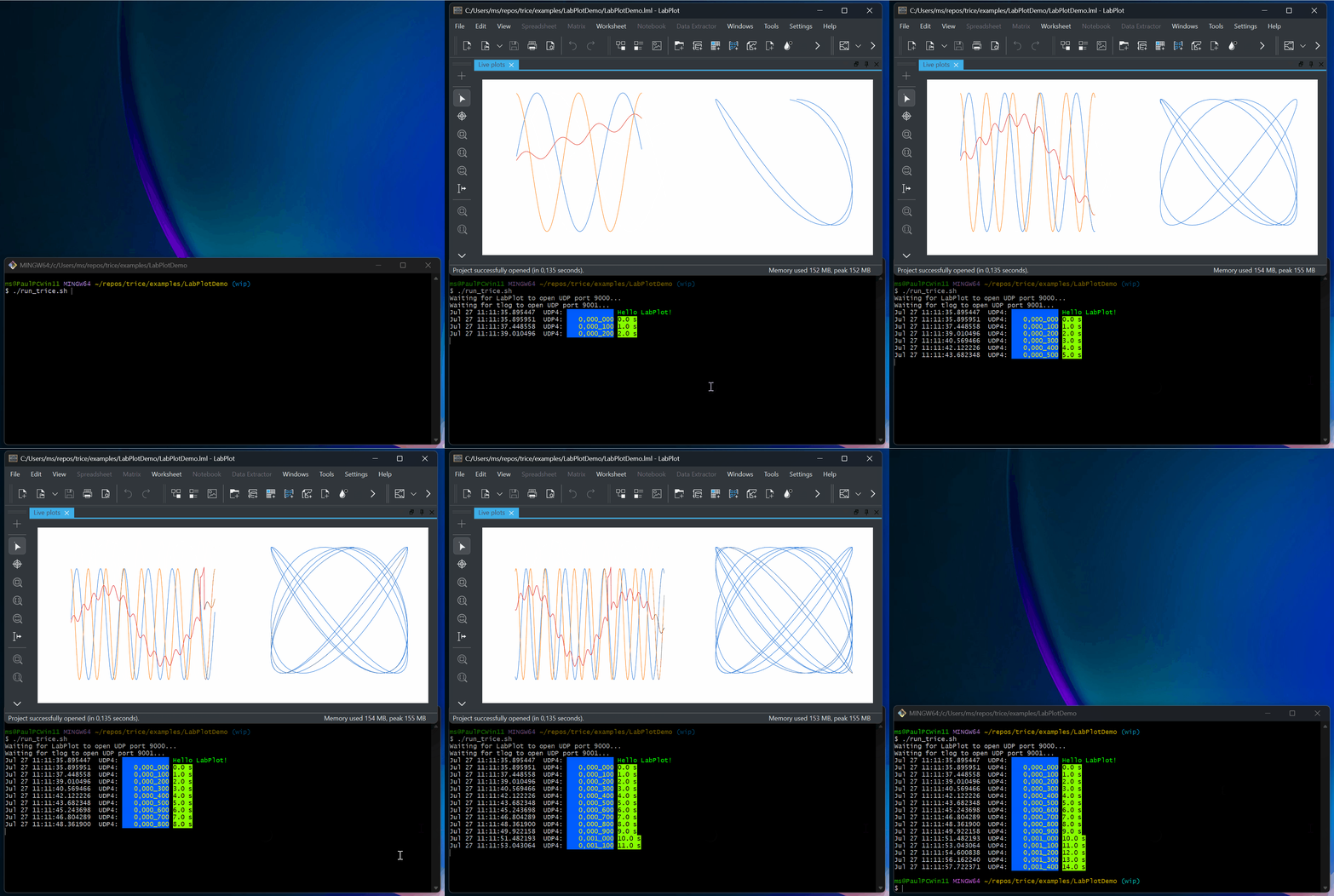
The trice log ... (tlog ...) CLI switch -vis='...' allows translations of selected Trice messages into any matching drawing tool inputs like CSV or JSON. The Trice tool is easy extendable to convert the binary Trice messages into any suitable binary format directly.
Check ./examples/LabPlotDemo and the reference manual for details,
Project information
Installation
Use one of these options:
# macOS with Homebrew
brew install rokath/tap/trice
Or download a release binary from the latest release and put trice into your PATH.
With Go and Bash installed, build and install trice and tlog from the repository root of your checkout:
./scripts/buildTriceTool.sh
The script prints the installation paths. Ensure that the installation directory is in your PATH.
Check the installation:
trice --version
trice help -insert
trice help -log
Documentation and examples
- Trice Reference Manual
- GitHub Pages documentation
- Generated CLI help
- Target source configuration defaults
- Examples
- Issues, including closed items
- Discussions, including closed items
Development setup and debugging
The example projects show Trice integration with VS Code, Makefiles, Clang/GCC, STM32 projects, RTT, and UART-style output. Use bare/instrumented project pairs to inspect the minimal integration diff.
Debug a Trice project in Direct-Out Mode over SEGGER-RTT.

Project status



Trice is usable today and actively maintained.
Use the latest release or the main branch when building from source.
Avoid development branches unless you intentionally want unreleased work.
Contributions are welcome: examples, platform recipes, transport backends, documentation improvements, and reproducible benchmark reports are especially valuable.
Future ideas
Potential future work includes:
- a small
tlogtool in C, Python, Rust, TinyGo, Wasm, or another runtime for environments where Go is not the best fit, - more structured logging support; see the structured logging specification draft,
- additional transport recipes,
- adaptation for a visual RTOS/event timeline tool.
Support the project
- Star this project if it helps you.
- Contribute examples, fixes, documentation, or platform recipes.
- If Trice helps a commercial product, consider supporting continued maintenance through the sponsor links on the GitHub project page.
Support options:


Similar projects
Trice overlaps with several logging, tracing, and tokenization approaches, but it targets a specific niche: compact printf-like logging for embedded C/C++ with host-side ID decoding.
- plain
printf/ UART logging - ARM ITM/SWO (hardware-native)
- ARM Keil Event Recorder (hardware-native)
- baical.net (C)
- call stack logger function instrumentation (trace program execution flow)
- Debugging with Dynamic Printf Breakpoints (Eclipse IDE option)
- defmt (Rust)
- Diagnostic Log and Trace (AUTOSAR)
- Embedded Logger (elog) (Embedded logger with minimal footprint and memory usage)
- Logging with symbols - The Embedonomicon
- McuLog (McuOnEclipse)
- MCUViewer
- Memfault Compact Log Library (part of firmware SDK)
- Minimal Structured Logging for Autonomous Vehicles (C++, closed source talk)
- NanoLog (C++11) (Linux C++)
- Percepio Tracealyzer (with TraceRecorder) (Visual Trace Diagnostics)
- Pigweed Trace Tokenized
- Postform (Postponed formatting experiments with string interning in C++, inspired by the defmt Rust crate)
- qpspy (C/C++)
- Real-time binary data logging/tracing toolkit
- SEGGER RTT
- SEGGER System View
- Tonbandgerät (Small embedded systems tracer with support for bare-metal and FreeRTOS-based targets)
- Traces (API tracing framework for Linux C/C++ applications)
- uLog (RD Poor)
- Zephyr Dictionary Based Logging
- project-specific binary loggers.